


Docketing is one of the most important aspects of any law firm or legal practice. Using a Legal Calendaring Software syncs, tracks, and centralizes all your litigation cases, legal deadlines, obligations, and meetings – in one place. In addition to automated notifications and other useful functions. That said, such systems are usually embedded as part of a more robust Legal Practice Management Solution, and often integrate with other tools and applications that legal practitioners use every day.
In the following blog, we break down everything you need to find the best legal calendaring and docketing software for attorneys, legal teams, or law firms of any size.
Benefits of Legal Calendaring Software
Central Updated Source of Truth
Moreover, having a Legal Calendaring Software means all team members have a central source of truth to reference, this not only includes important calendar events, but also covers related cases, matters, and documents for each entry. Users can input, update, and extract all related data in one place.
Seamless Live Collaboration
Collaborating with teams or clients in different countries or time zones can be challenging in several ways. So, Legal Calendaring Software facilitates communication, centralizes updates to events, and allows users to work collaboratively in one legal calendar.
What is docketing or legal calendaring software?
For attorneys and law firms, alike, excellent management of calendars and deadlines is critical. A Docketing Software is a solution, platform or tool used to schedule and track deadlines in legal proceedings. It is used to keep track of cases and make sure all important legal deadlines are met.
For instance, a law firm docket may include items such as meeting schedules, court deadlines, discovery deadlines, client obligations, marketing schedules, hearing dates, and much more, designated to specific members of the law firm.
In other words, a Legal Calendaring Software helps law firms and court clerks track court cases, active litigation, and related documentation. It’s main purpose is to alert attorneys and paralegals of upcoming deadlines. However, today, docketing systems have developed into more complex and effective systems that do much more.
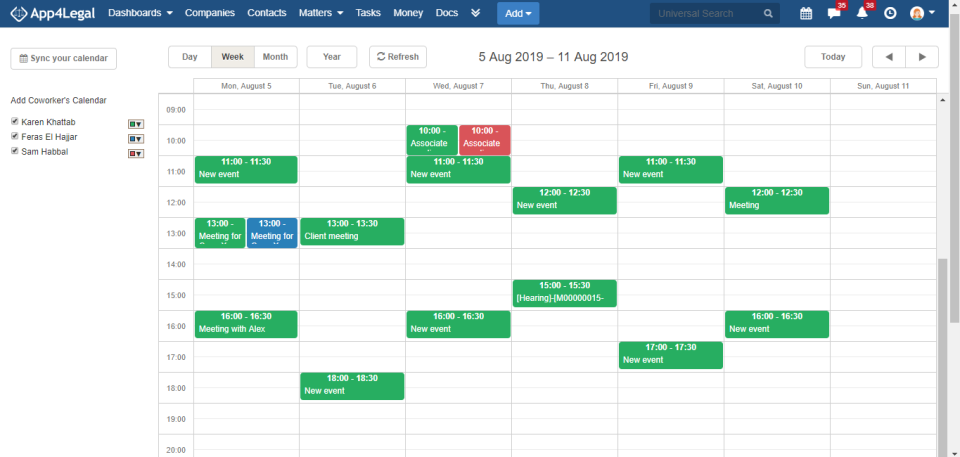
Common Features for a Legal Calendaring & Docketing Solution
Nowadays, you can expect to see a wide range of functionalities offered by these software solutions. As a result, legal practitioners are able to choose a solution that suits their needs. Below, we list some of the main features associated with the best legal calendaring solutions.
Email Integration
Integration with email platforms, such as; Microsoft Outlook and Gmail™ – allowing users to create tasks or calendar events directly through their email and sync across platforms.
Task Management
Assign tasks with scheduled due dates to be completed by specific users, in order to bring the case to a close. Save task lists to facilitate workflows of similar cases in the future. Read more about task management software for lawyers.
Calendar Management
Full visibility on tasks, appointments, meetings, deadlines, and docket items. Filter by attorney, case, client, etc. Link events to case information, tasks, and related events.
Performance Insights
Additionally, online legal calendaring systems allow for visibility at a micro and macro level and streamline the entire process. No more wondering who is doing what or when someone will be back. Track deadlines, oversee attorney and staff performance, ensure client satisfaction, and much more. Make sure your team is operating smoothly and that everyone knows what is expected of them at all times.
Document Management
Upload, attach and link files to cases securely. Moreover, you can track versioning and access controls to dictate who can access, change and share files.
Case Management
Store and retrieve case information in a centralized and searchable database. As a result, you can check for conflicts of interest and statute of limitations.
Automatic Reminders
Schedule notifications to remind assigned users of upcoming deadlines for case-related tasks, such as; court filings, client meetings, responding to discovery, etc.
Task Automation
Manually updating and calculating important legal deadlines is tedious work and is likely to result in errors and discrepancies. When your deadlines are accurately and automatically calendared, your legal team will save time, increase efficiency, and be certain that no detail is overlooked.
Rules-Based Calendaring
Automatically apply the court rules and statutory deadlines of specific jurisdictions to the due dates of a particular matter at the start of each case. Eliminate manual entry for every deadline of every litigation matter. Rules-based calendaring systems even automatically recalculate deadlines if key due dates change.
Audit trail
Store archives of all calendaring and docketing items, tasks history, and related reminders sent. Thus, you can protect the firm and the attorney in the event of a malpractice suit, and keep users compliant with regulations.
What should you look for?
There are various reliable websites, such as GetApp that allow users to compare different solutions based on functionality, reviews, and features. That said, we mapped out the most essential features of the best legal calendaring and docketing software for solo lawyers, small to medium-sized practices, and large law firms.
Solo Lawyer
Besides the basic functions, solo lawyers need a solution that has email integration with a shared calendar tool. In addition to basic task & matter management functions.
Small to Midsize Practice
Small- or medium-sized law firms need case management software that includes calendaring and docketing, document management, and time tracking and legal billing. Read more about legal billing, key features and benefits
Large Law Firms
Similarly, large law firms will need the above-mentioned and more. A robust Legal Practice Management Solution, with a wider range of tools and functions, including dashboards, analytics, automation, and more.
Ready when you are
Bring this workflow into Lexzur
Start a free trial today, or book time with our team for a guided walkthrough first.
Frequently Asked Questions
Legal calendaring software is a tool that helps attorneys and law firms schedule, track, and manage court dates, filing deadlines, hearings, and client meetings in one central calendar. Most solutions add automated reminders, task assignment, and links to related cases and documents, so no deadline is missed.
The terms are often used interchangeably. Calendaring usually refers to scheduling events and deadlines. Docketing is the broader process of recording, calculating, and tracking every deadline tied to a case, often based on court rules. Modern legal software combines both in one system.
The best option depends on your firm’s size and workflow. Look for rules-based deadline calculation, Outlook and Gmail sync, automatic reminders, task management, document linking, and an audit trail. Small firms may need a simple shared calendar, while larger firms benefit from a full practice management platform with analytics and automation.
Most leading solutions do. Email integration lets you create calendar events and tasks directly from your inbox and keeps deadlines synced across your devices and your team’s calendars. Confirm whether the sync is two-way before you buy, so changes made in either place stay consistent.
Key features include rules-based deadline calculation, automatic reminders, email and calendar integration, task management, case and document management, filtering by attorney or client, performance insights, and a full audit trail. Cloud access and role-based permissions are also important for remote and multi-office teams.
Missed deadlines are one of the most common causes of legal malpractice claims. Calendaring software reduces that risk by calculating deadlines automatically, sending reminders to responsible team members, and keeping an audit trail that documents when deadlines were entered, changed, and acted on.
Common causes include manual deadline calculations, double entry across disconnected calendars, outdated court rules, unclear responsibility for tasks, and changes to trigger dates that aren’t carried through to related deadlines. Centralized, rules-based software with automatic recalculation addresses most of these issues.
Yes, and that is increasingly common. Many firms choose a legal practice management solution that combines calendaring and docketing with case management, document management, time tracking, and billing. This keeps every deadline connected to the related matter, client, and documents. You can try Lexzur free to see how this works in practice.



Leave a comment