

LEXA is the AI layer built into Lexzur, working across contracts, matters, documents, and legal workflows. With LEXA AI Agents & Workflows, teams can build specialized agents that apply capabilities such as document review, risk identification, summarization, legal analysis, commercial analysis, and information extraction within repeatable multi-step processes across Lexzur’s CONTRA and PRACTICE platforms.
For routine contract and legal work, teams can configure how specific tasks should be handled and reuse those processes whenever needed.
The result is a shift from simply asking AI questions to giving AI a defined role in the way work gets done.
Contract review rarely becomes difficult because of one clause. The challenge is volume.
Another NDA arrives. A procurement agreement needs approval. A matter file needs summarizing. Someone still has to identify obligations, compare documents, flag risks, and keep important information moving.
AI can help legal and business teams reduce this repetitive work. The bigger question is whether AI can operate within existing processes with enough context, control, and security to be genuinely useful. That is where LEXA comes in.
What Is LEXA?
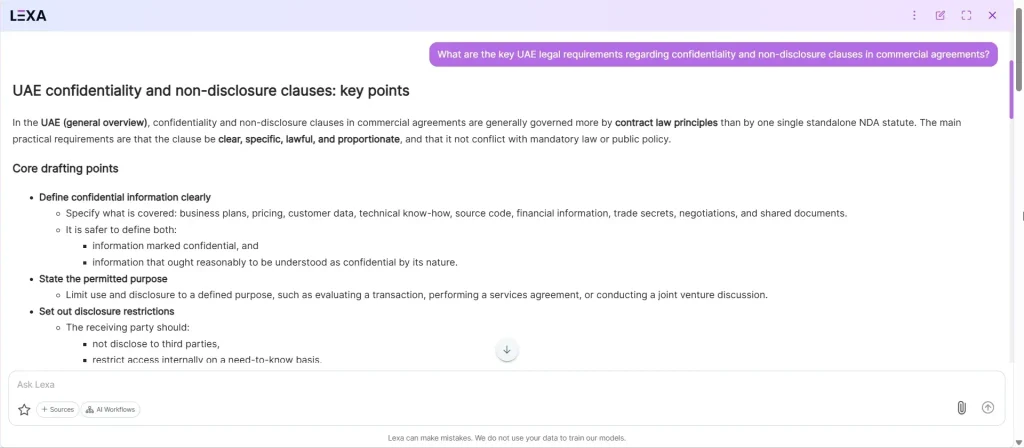
LEXA is the AI layer built into Lexzur. The agents your team creates are what you build with it.
Rather than requiring users to copy information into a separate chatbot, enter a prompt, and move the response back into their legal system, LEXA works alongside the contracts, matters, cases, legal documents, and workflows already managed in Lexzur.
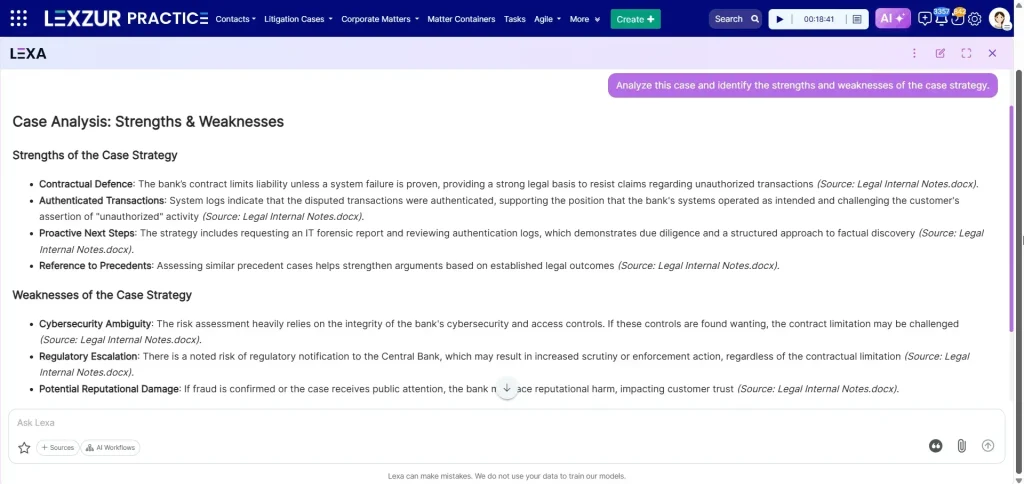
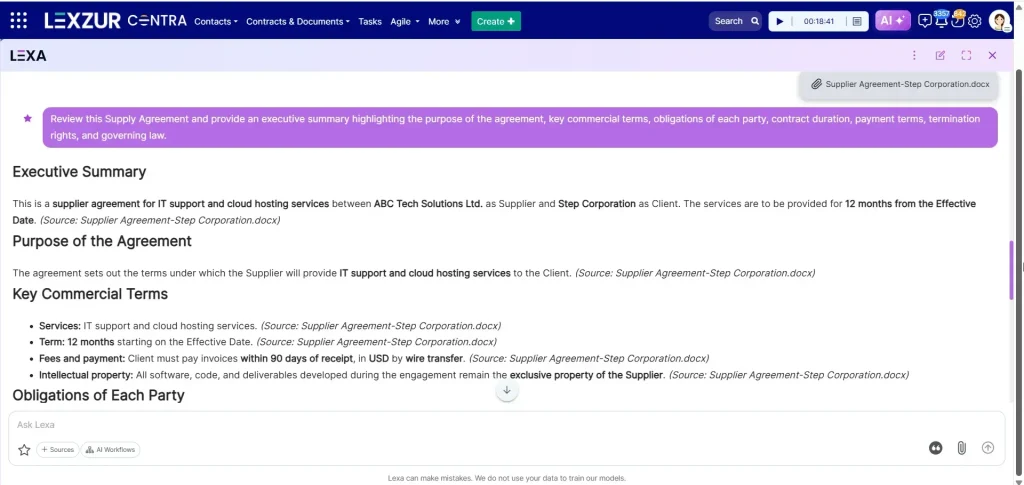
Within CONTRA, that means contract and document work. Within PRACTICE, matter and case analysis.
That matters because legal work needs context. Which contract is being reviewed? Which party does the team represent? What jurisdiction applies? What requirements should be checked? What should happen after the analysis?
LEXA is designed to bring AI into that broader workflow rather than treating every interaction as an isolated prompt.
What Are LEXA AI Agents & Workflows?
LEXA AI Agents & Workflows allow organizations to move beyond one-off prompting and configure specialized AI roles directly inside Lexzur.
An AI agent is created for a specific task. A legal team might configure a Contract Risk Reviewer. A law firm could create a Matter Briefing Agent. Procurement could use a Vendor Agreement Reviewer.
For each agent, users can define its name and purpose, instructions, response behavior, available tools, and reference data. Agents can also be edited, cloned, deleted, and managed centrally.
The benefit is specialization: teams can configure a recurring responsibility once and reuse it instead of redefining the same task every time it is needed.
Connect Agents into AI Workflows
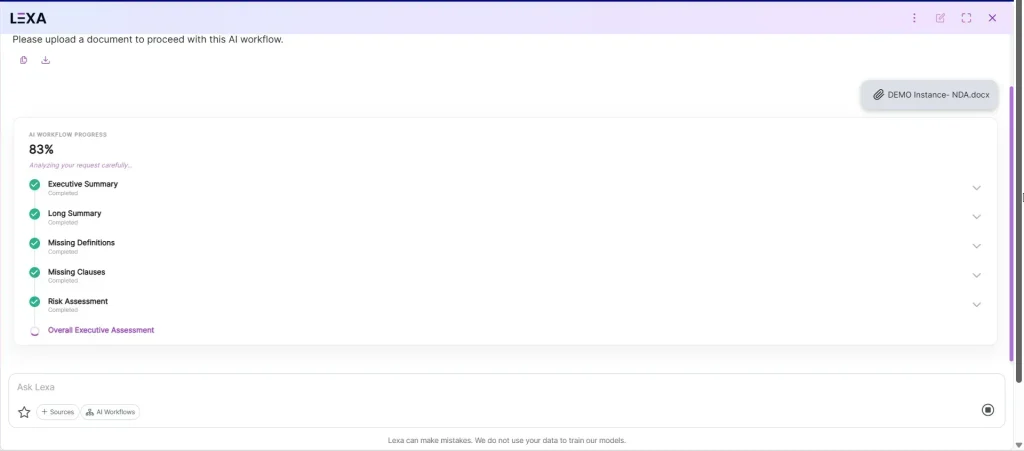
LEXA AI Workflows combine agents into multi-step processes. They can be configured in three ways:
Sequential: Agents run one after another in a defined order.
Dependent: a later agent can use outputs generated by one or more earlier agents.
Router: LEXA determines which agent or workflow path should handle the request based on the situation.
This allows teams to move beyond isolated prompts and build repeatable review processes around recurring work.
Set the Review Perspective
Review Perspective adds another layer of legal context by allowing a review to be approached from the buyer’s, seller’s, or a neutral point of view.
That matters because the same clause can have very different implications depending on which party you represent. A provision that protects the seller, for example, may introduce additional risk for the buyer.
LEXA AI Agent Use Cases for Routine Contract Management
For in-house legal teams, a Contract Risk Review workflow can read an uploaded agreement, identify and summarize key risks and non-standard clauses. A Vendor Agreement Check workflow can compare a vendor contract against standard terms and identify deviations. A Compliance Check workflow can review a document against defined regulatory or organizational requirements and surface gaps that need attention.
For law firms, a Matter Briefing workflow can review matter documents and produce a plain-language briefing before a client call. A Document Completeness Check workflow can compare a filing or case file against expected requirements and identify missing information.
For procurement teams, a Contract Comparison workflow can compare vendor terms against standard procurement positions, while an RFP Response Summary workflow can review proposals and organize important terms, pricing, and commercial information for comparison.
These examples show the core value of LEXA AI Agents & Workflows: AI tasks can be defined, reused, and connected to the way a team already works, without requiring an external AI solution or developer involvement for each use case.
How Does LEXA Work Inside a Legal Team Workflow
LEXA works around the contracts, matters, documents, text fields, email, and document editing already managed in Lexzur.
For example, when a new contract enters the system, a team can configure a workflow in which an agent summarizes the agreement, analyzes specific terms, flags concerns, or executes a predefined instruction. The result can then become part of the contract workflow that follows.
The instructions behind an agent or workflow also matter. A useful structure is:
Task + Context + Jurisdiction + Output
Instead of using a broad instruction:
“Review this agreement.”
A team could define the job as:
“Benchmark the indemnity clauses in this MSA against SaaS norms in the UK and return the main deviations with suggested alternatives.”
The second instruction gives the agent a defined task, relevant context, jurisdiction, and expected output. Once that responsibility is configured into an agent or workflow, the team does not need to redefine the same job each time it is applied.
For legal AI, a well-scoped task is generally more useful than a broad request because it gives the system clearer instructions about the context, standard, and expected output.
Who Is LEXA For? AI in Legal, Compliance & Procurement Teams
In-house legal departments can use LEXA across contract review, document analysis, matter work, risk identification, compliance checks, and summaries. By configuring recurring responsibilities as agents and workflows, teams can apply a more consistent approach to work that would otherwise require repeated manual review.
Law firms can use LEXA across case and matter documents, client preparation, legal analysis, document review, and other document-heavy processes within PRACTICE.
Procurement teams can apply LEXA to vendor agreements, commercial terms, RFP responses, contractual obligations, and approval-related work within CONTRA.
HR, compliance, KYC, finance, collections, legal operations teams and sales teams can use the same capabilities wherever their work depends on contracts, policies, or regulatory documents.
For regulated industries such as banking, telecommunications, real estate, and government, the value of AI also depends on security, permissions, governance, the ability to operate within complex legal and regulatory requirements, and how well the technology fits existing processes.
The shared need is simple: reduce repetitive work without losing control over how the work is reviewed and decided.
What Features Does LEXA Offer?
LEXA includes features that bring AI directly into the Lexzur environment and help legal teams adapt it to their own knowledge, processes, and recurring work.
LEXA AI Agents & Workflows
Create specialized AI agents for defined responsibilities and connect them into sequential, dependent, or router workflows.
LEXA AI Search
Find relevant information across available content without needing to remember an exact document name, page title, or location. Instead of searching through folders and records, users can ask for what they need in natural language and surface the information most relevant to their request.
LEXA Knowledge Base & Custom Instructions
Administrators can upload documents to LEXA’s Knowledge Base and define custom instructions that guide how LEXA responds. This allows organizations to incorporate their own reference information, knowledge, and preferences into LEXA’s responses.
Jurisdiction Settings
Users can select the relevant country of jurisdiction to help frame LEXA’s responses around the appropriate legal context. If no jurisdiction is selected, LEXA applies a general legal framework.
LEXA Inside Email
LEXA is available directly within Lexzur’s email composer. Users can use it to draft, rewrite, summarize, translate, or generate content based on an email thread without moving the work to a separate AI tool.
Chat History, Favorites & Preconfigured Prompts
Return to earlier conversations and continue your work. Frequently used predefined or custom prompts can be saved as favorites.
Together, these features allow teams to move beyond individual prompts and configure LEXA around their own knowledge, context, and recurring workflows.
What About LEXA Privacy and Data Security?
For legal teams, AI capability is useful only if sensitive information is handled appropriately.
LEXA is built on Microsoft Azure OpenAI’s generative AI technology. Lexzur states that data used with LEXA remains private and encrypted and is not used for training or shared publicly.
Lexzur is ISO 27001 certified, while its security documentation states that its hosting provider holds SOC 1, SOC 2, SOC 3, and ISO 27001 certifications. Its security framework also includes TLS/SSL protection for data in transit and AES-256 full-disk encryption for servers holding customer data in Lexzur cloud products.
Organizations conducting formal security reviews should still confirm the requirements relevant to their deployment, including data processing, retention, residency, access controls, permissions, and internal AI-governance policies as part of their broader AI adoption plans
Does LEXA Replace Legal Review and Legal Judgement?
No. LEXA should be treated as a first-pass review, analysis, review, and triage layer rather than a replacement for professional judgment.
Agents and workflows can be configured to summarize documents, locate clauses, identify potential risks, detect inconsistencies, compare information, and surface issues that deserve attention. These capabilities can then be applied through repeatable processes rather than requiring teams to redefine the same task for each contract, matter, or document.
Important outputs should still be validated against source documents, applicable law, organizational policies, commercial requirements, and the judgment of the legal professionals responsible for the decision.
The goal is not to remove human legal expertise but to help professionals reach the information requiring that judgment faster.
How Should Teams Evaluate LEXA Against Other Legal AI Platforms?
There is no single “best AI tool for legal contracts” for every organization because legal AI platforms can differ significantly in scope, workflow integration, security, and intended use case.
As a legal AI platform, LEXA’s differentiator is that it operates inside the wider CONTRA and PRACTICE environments, allowing teams to connect AI to the contracts, matters, documents, and processes already managed in Lexzur.
Some AI tools specialize in drafting or analysis. Contract management platforms may focus on creation, negotiation, approval, signature, obligations, and renewals. Practice management platforms may prioritize matters, cases, documents, billing, and reporting.
Teams should compare legal AI tools based on review quality, explainability, workflow integration, security, human oversight, human review, configurability, reporting, and what happens before and after the AI analysis.
For legal operations leaders, the important question is not only the quality of an individual AI response, but also how effectively the technology fits into the wider workflow.
The better question is not simply:
“Which AI gives the best answer?”
It is:
“Which AI fits the way our team actually needs to work?”
Frequently Asked Questions About LEXA
What Tasks Can LEXA Agents Perform?
LEXA supports contract analysis and matter analysis, including risk identification, compliance review, legal research, summaries, translation, clause and obligation extraction, governing-law analysis, ambiguity detection, issue identification, factual-consistency checks, argument extraction, and case analysis. Teams can configure these as reusable AI roles and connect them into multi-step processes.
How Much of This Can We Control?
The LEXA AI Agents & Workflows setup is configurable directly inside Lexzur, without development work.
You can define what each agent does, its instructions, its response style, the knowledge it can reference, and the tools it can use. You can then group agents into AI workflows that run sequentially, allow agents to work from earlier results, or route to the appropriate agent based on the situation.
Before running a workflow, you can also choose the Review Perspective, so the AI can review from a specific party’s point of view—such as buyer or seller — or remain neutral.
Agents and workflows can be created, edited, and cloned from searchable settings grids, giving teams a no-code way to shape their AI setup around their own work.
What Can LEXA Actually Do as AI for Contract Review
LEXA supports contract work in three ways.
It compares. Incoming contract language is read against your templates and policies, with departures shown clause by clause.
It extracts. Governing law, jurisdiction, commercial terms, payment obligations, renewal dates, and trackable obligations are pulled out of the document rather than typed in by hand.
It summarizes. A long contract is reduced to what a non-lawyer needs in order to decide, with the source behind each point available for checking. It works as a review tool that compares, extracts, and summarizes
Each of these is applied through the agent and workflow setup, rather than repeated contract by contract. LEXA does not sign, approve, or make the final call on legal risk.
What Should In-House Teams Look for in AI Contract Review Software?
In-house teams should evaluate contextual review, drafting support, risk detection, clause analysis, workflow integration, security, and human validation. in any AI contract review software they choose
LEXA works inside CONTRA, helping teams apply AI without separating the analysis from the wider contract lifecycle.
Can LEXA Help Automate NDA Workflows at Scale?
Yes. LEXA can be incorporated into NDA-specific workflows so routine contract review becomes one stage of a broader, automated process. “. CONTRA supports document automation, templates, configurable workflows, approvals, signatures, and contract lifecycle management.
The exact approval path should still reflect the organization’s own risk and governance policies.
Does LEXA Automatically Name Matters or Organize Legal Files?
PRACTICE gives legal matters, cases, and documents a single structured home, with configurable fields, permissions, and centralized file organization, so information stays findable as a matter grows.
LEXA works on top of that structure. LEXA AI Search lets teams find what they need across matter documents in natural language, without recalling an exact file name or location, and a Matter The briefing agent can review the documents on a matter and produce a plain-language summary before a client call.
How accurate and secure is AI for legal contract review?
Accuracy depends on context — a tool with no access to your templates or jurisdiction is more likely to miss what actually matters. LEXA runs on Microsoft Azure OpenAI, keeps data private and encrypted, and isn’t used to train external models. Lexzur is ISO 27001 certified, and its hosting provider holds SOC 1, SOC 2, SOC 3, and ISO 27001 certifications, with TLS/SSL and AES-256 encryption. Treat outputs as a first-pass review, not a final answer.
What are the challenges or risks of using AI in legal contract management?
AI can miss a clause it wasn’t asked to check, misread ambiguous language, or apply the wrong standard — and unchecked, those errors move downstream. Inconsistent prompting also produces inconsistent results across a team. LEXA reduces this by having agents run on fixed instructions and jurisdiction rather than a fresh prompt each time, but outputs still need human validation.
What are the benefits of using AI for legal contracts?
AI speeds up repetitive work: reading agreements, flagging risks, extracting key terms, summarizing documents. The real gain is consistency — applying the same review across every contract instead of starting over each time. LEXA agents like a Contract Risk Reviewer are configured once and reused across every NDA or MSA that comes in.
Is there an AI that helps with legal matters beyond contracts?
Yes — legal AI can also support matter and case work: reviewing filings, checking documents against requirements, preparing briefings. LEXA covers this through PRACTICE, where a Matter Briefing agent can summarize a matter’s documents before a client call, and LEXA AI Search finds information without needing an exact file name.
Can ChatGPT review contracts, or are specialized AI tools better?
ChatGPT can read a contract, but it has no access to your templates, jurisdiction, or past decisions unless you paste them in each time. A specialized tool like LEXA already has that context: it works inside CONTRA and PRACTICE, can be scoped to a Buyer, Seller, or neutral Review Perspective, and feeds results into the next workflow step. For recurring, high-volume work, that built-in context is the deciding factor.
Can AI create or draft legal contracts?
AI can generate first-draft language and flag where a draft deviates from a template, but it shouldn’t produce a final agreement unassisted. LEXA is built mainly for review and analysis — comparing, extracting, summarizing — rather than generation, though CONTRA’s document automation and templates support drafting alongside it. Final language and risk decisions stay with the legal team.
Leave a comment