

The Hidden Cost of Fragmented Legal Workflows
Legal practice management software runs the operational and financial side of a law firm from one system — centralizing matters, documents, billing, deadlines, and client communication so firms capture more billable time, close bills faster, and get a clear view of profitability.
Written for law offices and enterprise legal teams, this guide explains what the legal practice management category includes, the hidden cost of running a firm on disconnected tools, how it differs from case tracking, which features matter, the benefits for firms and in-house teams, cloud versus on-premises trade-offs, how leading platforms compare, and more!
The American Bar Association reported that approximately 75% of attorneys used cloud computing for work-related tasks in its 2024 survey, up from 69% the year before. Yet moving work online does not solve fragmentation by itself: lawyers still lose productive time finding information, chasing signatures, switching between systems, and completing late time entries.
That is the problem a legal practice management system is designed to solve.It brings matters, documents, billing, calendars, tasks, and client interaction into one controlled environment.
1. What is legal practice management software?
Legal practice management software, often shortened to LPMS, is a system for running the operational and financial side of every law office. It organizes matters, contacts, documents, deadlines, tasks, time, expenses, invoices, payments, and communication so that the firm has one source of truth.
Modern platforms commonly extend into:
- Client intake
- Legal accounting
- Document automation
- E-signatures
- Client portals
- Workflow automation
- Analytics
- Mobile access
- AI assistance.
Not every product includes every function natively, which is why buyers need to distinguish the core subscription from paid tiers, add-ons, and third-party integrations.
2. What is the difference between practice management and case management software?
The terms overlap, but they describe different scopes.
| Legal case management software | Legal practice management software |
|---|---|
| Organizes work around an individual case or matter | Runs case work plus the firm’s wider operations |
| Tracks facts, parties, evidence, notes, tasks, and deadlines | Adds intake, time, billing, accounting, staffing, reporting, and business workflows |
| Helps lawyers and case teams manage and execute legal work | Also serves partners, administrators, finance teams, and business-development staff. |
| May be specialized by practice area, such as personal injury or litigation | Usually supports multiple practice areas and firm-wide administration |
Table: How legal case management systems and legal practice management software differ in scope and audience.
In 2026, most leading law practice management systems combine both. The practical buying question is therefore not, “Is this matter management or practice management?” It is, “How deeply does this platform support both our legal services and our business controls?”
3. Who needs legal practice management software?
Legal practice management software helps legal professionals and law firms centralize their operations, improve collaboration, strengthen operational and financial controls, and gain better visibility across matters and activities
Key requirements may include streamlined intake, matter management, billing and financial management, document management, task management, workflow automation, secure communication, workload visibility, reporting, granular permissions, audit trails, integrations, and support for multiple offices, entities, currencies, languages, and locations.
4. The five core modules every LPMS should cover
- Matter management — contacts, notes, tasks, deadlines, related documents, email, and a clear matter history.
- Time, billing, and financial controls — time and expense capture, rate structures, invoices, payments, and—where required—trust accounting.
- Document management — matter-based storage, search, version history, templates, permissions, and secure sharing.
- Client communication — portals, messages, status visibility, document exchange, intake, and payment access.
- Calendaring and work management — assignments, reminders, dependencies, recurring tasks, deadline controls, and team calendars.
Once the category is clear, the next step is deciding which capabilities are mandatory and which are merely attractive in a demo.
5. What features should I look for in law practice management software?
A feature is valuable only when it removes a real source of delay, risk, or revenue leakage. Use this ten-point checklist to evaluate a legal practice management platform against the work your firm performs every day
1. Matter and case management
Every matter should have a complete, searchable record: responsible lawyer, client and related contacts, practice specialty, status, tasks, appointments, documents, notes, communications, financials, and key dates.
Look for custom fields and configurable matter types so the software reflects your practice needs rather than forcing every team into one generic template.
Ask whether the system supports related matters, conflicts, ethical walls, bulk updates, matter templates, and a chronological activity record.
A clean matter screen matters more than a flashy homepage because it is where most users will spend their time.
During the demonstration, ask the vendor to configure two materially different matter types and show whether both can roll up into consistent firm-wide reporting.
2. Time tracking, billing, and payments
Good time capture works at the point of activity. Useful options include timers, mobile entries, email or calendar-based suggestions, daily time views, narrative templates, and warnings for missing entries.
Billing should accommodate hourly, flat-fee, contingency, subscription, capped, split, and blended arrangements as relevant to your firm.
Verify batch billing, prebill review, invoice approval, write-offs, discounts, taxes, LEDES or e-billing, online payment processing, payment plans, and reporting on work in progress, accounts receivable, realization, and collection.
3. Trust accounting and financial management
Trust accounting is not ordinary bookkeeping. Funds held for clients must be separated, accurately attributed, and reconciled according to applicable bar or jurisdictional rules.
Look for three-way reconciliation, matter-level ledgers, safeguards against overdrawing trust funds, transfers from trust to operating accounts, audit-ready reports, and controls over who can post or approve transactions.
Some platforms include a general ledger; others integrate with QuickBooks Online or another accounting system. Neither design is automatically better.
What matters is whether the connection is real-time, reliable, and able to eliminate duplicate entry.
4. Document management and e-signature
Documents should be matter-based, searchable, permission-controlled, and versioned.
Useful additions include email filing, OCR, templates, automated assembly, metadata, retention rules, and Microsoft 365 or Google Workspace integration.
E-signature should preserve the signed copy and audit evidence in the correct matter; confirm any send limits or extra charges.
5. Client communication and portal
Intake should convert a qualified lead into a matter without retyping information. Look for conditional forms, conflict-check support, booking, engagement-letter generation, e-signature, and workflow triggers.
A portal should give clients simple, controlled access to messages, documents, appointments, invoices, and payments. Test it from a client’s phone; if it is confusing, clients will return to email.
6. Legal calendaring and deadline management
The system should link deadlines to the correct matter, people, and documents and synchronize with the firm’s calendars.
Litigation practices should assess jurisdiction-aware court-rule calculations or specialist deadline integrations.
Reminder chains, dependencies, reassignment, permissions, and audit history matter more than a colorful view.
7. Tasks, workflows, and automation
Workflow automation converts a playbook into repeatable tasks, owners, deadlines, document requests, and checkpoints.
Look for conditions, dependencies, approvals, templates, escalations, and workload views. Ask who can edit workflows and whether changes affect active matters; automation without governance reproduces mistakes at scale.
8. Reporting and dashboards
Reporting should identify stalled matters, approaching deadlines, overloaded staff, unbilled work, profitability, and collection speed. Test filtering, drill-down, scheduling, export, and dashboard creation without a developer.
A static chart that cannot lead to action is decoration, not business intelligence.
9. Integrations and API access
List every system you will keep and verify each connection by name. “Integrates with” can mean native two-way sync, a marketplace connector, automation, one-way export, or a custom API project.
Ask what moves, in which direction, how often, how errors are handled, and whether another subscription is required.
10. Security, privacy, administration, and mobility
The baseline includes encryption, multifactor authentication, role- and matter-based access, audit logs, backups, tested recovery, vulnerability management, and incident response.
Independent assurance such as SOC 2 Type II or an appropriate ISO certification is stronger evidence than “bank-grade” language. Also assess single sign-on, provisioning, retention, export rights, session and device controls, and useful mobile workflows.
Three features are easy to overlook in a demo: usable data exports, genuine integration depth, and administration controls for permissions, audit history, retention, and offboarding. Confirm all three before you sign.
6. What Are the Benefits of Using Law Practice Management Software for Your Law Firm?
Every law firm measures the platform partly through service delivery, billable work, and profitability. An enterprise legal team measures it through intake, governance, collaboration, and visibility across the organization.
Benefits for law firms:
- Higher productivity — Centralized matters, documents, tasks, and calendars reduce searching, re-entry, and unnecessary handoffs.
- Stronger billing discipline — Point-of-activity time capture, prebill workflows, invoice controls, and payment tracking help reduce missed time and shorten billing cycles.
- Better matter organization — Standard matter structures, templates, ownership, and deadline controls give teams a complete, searchable history.
- More consistent client service — Portals, automated updates, secure document exchange, and clear responsibilities improve responsiveness without increasing email volume.
- Clearer profitability — Dashboards can connect work in progress, realization, collections, staffing, and matter performance so leaders can act earlier.
- Less administrative work — Automation can create assignments, reminders, approvals, and repeatable task sequences from defined firm processes.
Benefits for enterprise and in-house legal teams:
- Centralized legal intake — Requests enter through a controlled channel with the context, priority, and documents needed for triage.
- Standardized workflows — Common request types can follow consistent stages, service levels, approvals, and escalation paths.
- Improved collaboration — Legal professionals and teams, business stakeholders, and external advisors can work from controlled records rather than disconnected inboxes.
- Granular permissions — Role-, team-, and matter-level access supports confidentiality, ethical walls, and appropriate business visibility.
- Stronger governance — Audit trails, required fields, templates, and approval controls make policy easier to apply and demonstrate.
- Management reporting — Dashboards give leadership visibility into workload, cycle times, matter status, bottlenecks, service levels, and spend.
7. Cloud-Based vs. On-Premises: What to Check Before You Buy
Cloud-based legal software gives small, mid-sized, and large firms browser-based access, vendor-managed updates and backups, remote-work capabilities, and reduced server maintenance.
On-premises or private deployment may better suit organizations with strict data-residency, government, client, or security requirements
Ask in every vendor demo:
- Can we export all of our data and documents in usable formats?
- Which features and integrations cost extra?
- What is the uptime commitment?
- What is included in migration and training?
- Does the mobile experience support our key workflows?
- Where is our data stored and backed up?
- What happens to our data when the contract ends?
With the evaluation criteria established, we can compare products by buyer fit rather than treating one platform as universally superior.
8. Best Legal Practice Management Software in 2026 by Firm Type and Operating Model
No one platform is universally right. A two-lawyer estate-planning firm, a 60-lawyer multilingual practice, and an enterprise legal department have different risks, workflows, financial models, and integration needs. The comparison below organizes platforms by strongest fit so buyers can build a relevant shortlist instead of treating market visibility as proof of suitability.
Methodology: We reviewed publicly available vendor pricing, product, integration, and security information on August 13, 2026. The fit groupings are editorial assessments, not objective scores, awards, or the result of hands-on testing of every platform.
Editorial disclosure: This guide is published by Lexzur, the all-in-one legal practice management software. Competitor information is based on publicly available vendor materials and should be verified directly before purchase.
Pricing note: Public prices below were verified on August 13, 2026, are in USD, and may assume annual billing. Prices, packaging, promotions, taxes, payment fees, implementation, AI usage, and add-ons can change. Request a complete written quote based on your actual workflow.
| Platform | Strongest fit | Public starting price | Standout strength | Watch carefully |
|---|---|---|---|---|
| Lexzur PRACTICE | Configurable, multilingual, and multi-office law firms needing advanced matter management, billing, AI, and complex operational workflows | Quote required | International readiness, configurable workflows, integrated billing, AI capabilities, reporting, and flexible deployment options | No public pricing, so total cost cannot be compared directly from published information. Request an itemized quote covering licensing, implementation, migration, integrations, deployment, training, support, and renewal terms. |
| Clio | Ecosystem- and integration-led firms with a broad scaling path | From $49/user/month | Extensive platform, integrations, accounting, and AI direction | Several plan prices and advanced add-ons require a quote; calculate fully loaded cost |
| MyCase | Solo and small law offices prioritizing an integrated, approachable experience | $50/user/month annually | Intake, communication, billing, e-signature, and AI in upper tiers | API, advanced AI, and some controls require higher tiers; accounting is extra |
| PracticePanther | Solo and small law offices wanting straightforward cloud practice management | $49/user/month annually | Accessible core feature set and mobile support | Intake, native e-signature, LEDES, and full accounting sit in higher tiers |
| Rocket Matter | Billing-led and data-driven small to mid-size firms | Public page shows conflicting $49 and $59 starting prices | Billing, dashboards, workflow visibility, and legal accounting at top tier | Confirm the applicable entry price, plan presentation, and tier limits directly with the vendor |
| LeanLaw | QuickBooks Online firms focused on accounting and revenue operations | Core $55/user/month; Pro $75; Elite custom | QBO-centered billing, trust, matter-based accounting, and revenue reporting | QuickBooks Online is required and separately priced; it is not a complete case-management, intake, or CRM platform |
| Smokeball | Solo and small law offices with document-heavy practices | From $149/month | Microsoft-centric document automation, forms, and automatic time options | Final price depends on package, user count, term, device requirements, and add-ons |
| CosmoLex | Small firms prioritizing built-in legal accounting | From $99/user/month | Practice management with accounting and trust controls | CRM and other capabilities may add cost; test workflow depth beyond finance |
| CARET Legal | Growing and mid-size firms seeking an all-in-one operational and accounting stack | From $79/user/month annually plus implementation | Native email, documents, billing, accounting, support, and training | Workflows, custom permissions, AI summaries, and stronger analytics require higher tiers |
| Filevine | Litigation and personal-injury firms with complex case workflows | Custom quote | Configurable litigation workflows, documents, analytics, and LOIS AI | Request a complete quote covering packages, migration, configuration, AI usage, implementation, and integrations |
Configurable, multi-office operations: Lexzur PRACTICE
Lexzur PRACTICE combines case and matter management, documents, workflows, billing, collaboration, reporting, dashboards, and Lexa, the AI legal assistant. Its strongest fit is with firms that need configurable processes across practice fields, offices, languages, currencies, regional formats, and time zones. Pricing is tailored, so buyers should compare a complete proposal covering migration, configuration, integrations, training, deployment, and ongoing service. A full breakdown of its capabilities follows in Take Your Legal Practice to the Next Level with Lexzur PRACTICE below.
Solo and small law firms: MyCase, PracticePanther, and Smokeball
MyCase — MyCase Basic starts at $50 per user per month with annual billing and includes core case tracking, time, invoicing, online payments, reporting, storage, and portal access. Pro adds intake, workflows, e-signature, document generation, richer communication, and AI assistance; Advanced adds deeper AI, API, conflict, and document-automation capabilities. It is an approachable option when a small firm wants a cohesive bundle and can identify the tier it actually needs.
PracticePanther — PracticePanther starts at $49 per user per month annually and provides an accessible core for matters, time, expenses, portals, storage, mobile access, payments, and document templates. Intake, custom roles and fields, e-signature, LEDES billing, and accounting sit higher in the package structure, so the entry price should not be treated as the final operating cost.
Smokeball — Smokeball suits document-intensive small firms that value Microsoft 365 integration, practice-area templates, document automation, e-signature, portals, billing, and optional automatic time capture. Packages are advertised from $149 per month, but firms should confirm the exact package, device requirements, user count, contract term, and included add-ons.
Growing and mid-size firms: CARET Legal
CARET Legal publishes plans from $79 per user per month annually plus implementation. Its all-in-one approach brings email, documents, calendars, tasks, billing, accounting, reporting, a client management portal, and payments together. Higher tiers add automated workflows, custom permissions, AI summaries, and stronger analytics, making implementation scope and tier selection central to the comparison.
Ecosystem- and integration-led firms: Clio
Clio covers matters, documents, time, billing, legal accounting, payments, collaboration, intake, AI-assisted functions, and a broad integration ecosystem. Starter is listed from $49 per user per month, while several higher plans and add-ons require a quote. It is a natural benchmark when integration breadth and future extensibility lead the buying decision, but firms should price the exact mix of intake, document automation, AI, payments, and retained third-party systems.
Accounting- and billing-led firms: Rocket Matter, LeanLaw, and CosmoLex
Rocket Matter — Rocket Matter emphasizes time, billing, accounting, matter status boards, configurable dashboards, and workflow visibility. Its public pricing page currently displays Essentials at $59 per user per month annually, although its FAQ separately states that plans start at $49. Buyers should confirm the applicable entry price directly and identify which workflow, dashboard, e-signature, and accounting functions require higher tiers.
LeanLaw — LeanLaw is a legal revenue-operations and financial layer built around QuickBooks Online. It supports time and expense tracking, billing, payments, accounting, matter-based accounting, compensation reporting, and revenue analytics. Core starts at $55 per user per month and Pro at $75; Contingency and Elite are custom-priced. QuickBooks Online is required separately, and firms needing deep intake, case workflows, or document automation may need additional systems.
CosmoLex — CosmoLex combines practice management, billing, business accounting, and accounting in one product. Core is currently listed from $99 per user per month, with Pro at $129. This can reduce synchronization between separate practice and accounting software, but buyers should test intake, automation, reporting, and document depth against broader platforms.
Litigation-focused firms: Filevine
Filevine is designed around configurable case workflows, collaboration, documents, portals, analytics, and litigation-specific work. Its LOIS offering includes contextual matter assistance, drafting, document analysis, data extraction, deposition transcription and summaries, medical chronologies, and workflow validation. Pricing is custom, and implementation may involve certified partners, so the quote should cover packages, migration, configuration, AI usage, and integrations.
Enterprise and in-house legal teams: additional requirements
Enterprise and in-house teams should evaluate centralized intake, matter governance, permissions, service levels, collaboration, reporting, integrations, outside-counsel processes, and deployment alongside traditional LPMS capabilities. Where legal spend, outside counsel, or organization-wide request management outweighs law-firm billing and trust accounting, buyers should also evaluate the broader enterprise legal management scope.
9. How You Can Take Your Legal Practice to the Next Level with Lexzur PRACTICE
Lexzur PRACTICE is an AI matter management platform that combines matter and case tracking with documents, tasks, workflows, time and billing, collaboration, reporting, and administration. Its strongest positioning is not that every buyer needs the same configuration. It is that firms can configure the environment around their operating model, practice fields, permissions, regional requirements, and management priorities, with additional workflows available for enterprise legal teams.
1- Matter Management in Lexzur PRACTICE
The platform provides a central workspace for legal teams to connect matters and cases with contacts, documents, notes, tasks, appointments, deadlines, communications, expenses, and financial information
For a law firm, that can mean giving litigation, corporate, advisory, and other practices different matter structures while maintaining firm-wide visibility. For an enterprise legal team, it can mean organizing internal requests, disputes, advisory matters, external counsel activity, and related documents with controlled ownership and access.
The important test is not whether the platform can store a matter. Buyers should demonstrate how it handles related records, confidential work, reassignment, approvals, overdue actions, and management reporting from opening through closure.
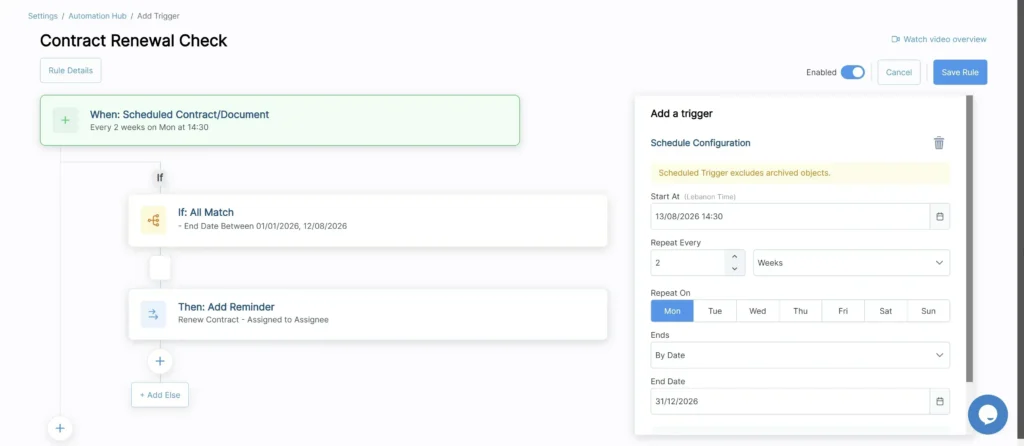
2- Lexzur Automation Hub Standardizes Legal Workflows
The Lexzur Automation Hub lets administrators translate repeatable legal processes into rules, triggers, conditions, and actions. Depending on the workflow, it can support:
- Task and workflow automation
- Reminders, notifications, and escalations
- Assignments and reassignment rules
- Approvals and review checkpoints
- Document generation and defined document actions
- Invoice, matter, case, contract, and client-request actions
This is useful when the same process must be followed consistently across teams or offices. Automation should still be governed: administrators need to control who can change rules, test exceptions, review automation history, and confirm what happens to active matters when a rule changes.
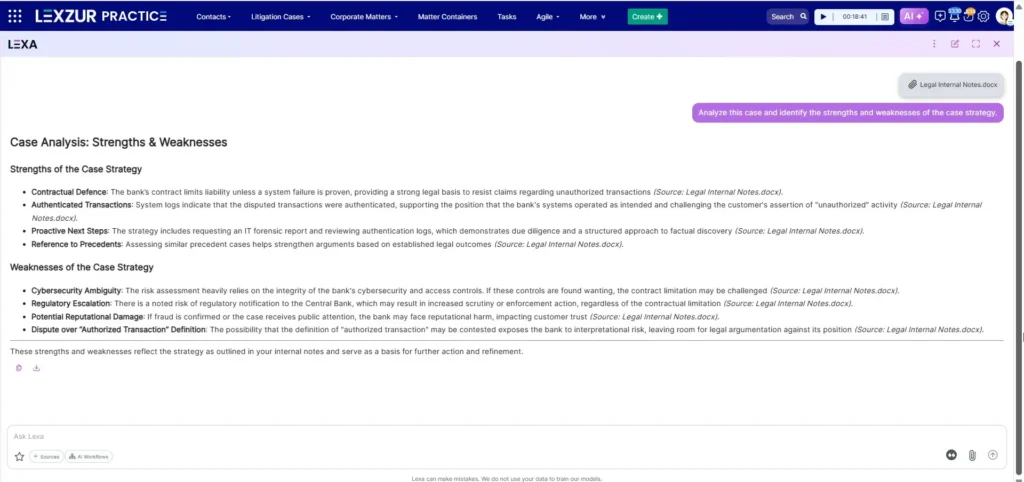
3- LEXA Supports AI Legal Technology Practice Management
LEXA is the AI legal assistant integrated into Lexzur PRACTICE. For case and matter work, Lexa can assist with summaries, issue identification, strengths-and-weaknesses analysis, factual consistency checks, argument extraction, risk evaluation, compliance assessment, and document translation.
The practice-management value comes from supporting legal analysis within the broader environment where matters, documents, tasks, permissions, and workflows are managed. Lexa can help law offices and users understand information, while the Automation Hub and configured processes continue to control assignments, reminders, approvals, and repeatable operational steps.
Lexa AI assistant does not replace legal judgment or professional review. Users should verify outputs against the source, apply the correct client and jurisdictional context, and ensure that access and approval controls remain effective.
4- Reporting, Dashboards, and Management Visibility
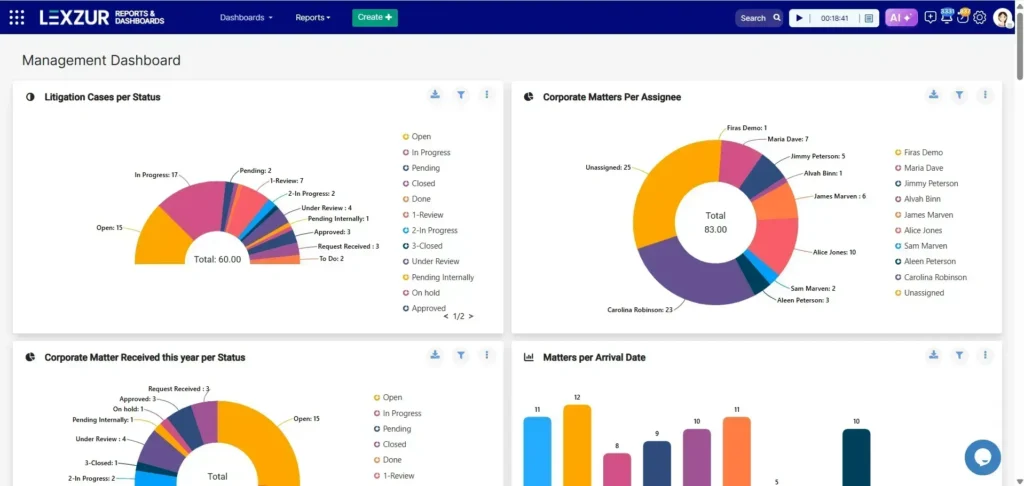
Lexzur PRACTICE combines operational reporting with dashboards and configurable business-intelligence metrics. Firms can use this layer to monitor matter status, deadlines, workload, time, billing, collections, and performance indicators. Enterprise legal teams can focus reporting on intake, request volumes, cycle times, service levels, work allocation, external activity, and management visibility.
Dashboards are valuable only when they reflect reliable operational data. During evaluation, buyers should test their own custom fields, filters, drill-down questions, permissions, exports, and scheduled reports rather than relying on a standard demonstration dashboard.
5- Supporting Law-Firm and Enterprise Legal Work flows
Law offices and enterprise legal teams share a need for controlled matters, documents, tasks, collaboration, and reporting, but they do not operate identically. Law organizations typically prioritize time capture, billing, client service, profitability, and trust-related controls. Enterprise teams may prioritize centralized intake, permissions, governance, service levels, outside-counsel coordination, and reporting to leadership.
Lexzur PRACTICE can be configured around these different priorities. Buyers should define which workflows belong in legal practice management and whether broader enterprise legal management, contract lifecycle management, or portal capabilities are also required.
6- International and Security Readiness
For international, multi-office, and GCC operations, Lexzur PRACTICE supports multilingual use—including Arabic—multiple currencies, regional configuration, and reporting across different operating units. Implementation should also define matter structures, fields, permissions, Automation Hub rules, dashboards, integrations, migration scope, training, and deployment before go-live, across Lexzur’s cloud, private SaaS, and on-premises options. The full checklist for validating country-specific workflows, privacy, billing, integrations, support, and data-location requirements—along with the supporting certification, security, support, and privacy evidence — is covered later in this guide, under Security, Support, and International Legal Practice Management.
10. AI Legal Practice Management: How AI Is Redefining Law Firm Software
AI in law firm software is now useful in defined, reviewable tasks. It is not a substitute for legal judgment, supervision, or verification. The most valuable implementations keep the user inside the matter, use authorized firm data, show the source, preserve permissions, and make review easy.
Where AI lives inside LPMS today:
- Time and billing. AI can suggest time entries from emails, documents, calls, calendars, or matter activity; improve billing narratives; detect missing time; and prepare draft bills based on defined rules. The value is less end-of-week reconstruction and a faster path from work to invoice. Lawyers must still confirm the matter, duration, description, and billing rules on every AI-assisted entry before it goes out.
- Matter and document summaries. Systems can summarize a long document, email thread, discovery set, or matter history. Better tools link claims back to source material so the lawyer can verify the output.
- Task and deadline extraction. AI can identify obligations, dates, people, and actions in a document, then propose calendar events or tasks. Human confirmation remains essential, particularly for procedural deadlines.
- Intake and triage. AI-assisted forms and conversational tools can collect initial information, classify an inquiry, identify missing fields, and route it. They should not provide unsupervised legal advice or make opaque eligibility decisions.
- Drafting and communication. AI can create first drafts of routine correspondence, client updates, summaries, time narratives, and template-based documents. These outputs must be reviewed for facts, tone, privilege, and legal accuracy.
- Analytics and data quality. AI can identify incomplete matter data, predict workflow bottlenecks, surface anomalies, or make dashboards easier to query. Predictions should be treated as decision support, not objective truth.
Current examples include Clio’s AI-assisted practice workflows, MyCase’s 8am IQ assistants, Smokeball’s Archie and AI-supported communication/intake, Filevine’s LOIS platform and specialized AI tools, and LEXA, the AI legal assistant integrated into Lexzur PRACTICE.
1- AI for Law and Lawyers: AI Practice Management vs Legal Research AI
AI practice management works with matters, tasks, documents, time, billing, and firm data. Research AI works primarily with law, precedent, authoritative sources, drafting, and analysis. Some products blend both, but buyers must verify the sources, jurisdictional currency, firm data, and matter permissions behind each answer.
2- What to Ask Vendors Before Trusting an AI Feature With Client Data
- What data is sent to an AI model, and for which feature?
- Which model providers and subprocessors receive it?
- Is firm or client data used to train shared models?
- Where is data processed, stored, logged, and retained?
- Do existing user and matter permissions apply to AI retrieval and outputs?
- Can administrators disable features, limit access, and review AI activity?
- Does the output cite or link to the source, and how should users report an error?
Also assess confidentiality terms, cross-border transfers, deletion, incident response, model changes, human review, acceptable-use controls, and whether the vendor contract allocates responsibility appropriately.
AI governance rule: Never buy an AI feature solely from a staged answer. Test it on an approved, representative, nonprivileged dataset that includes ambiguity, missing information, conflicting documents, restricted matters, and an expected “I do not know” case.
AI can accelerate work only when the surrounding calendar, document, permission, and integration infrastructure is dependable — which is why calendaring and integrations deserve the same scrutiny as the AI features themselves.
11. Legal Calendaring, Scheduling, and Software Integration: Built for the Way Law Firms Work
1- What must legal calendaring do that a generic calendar cannot?
A shared calendar can store a hearing date. Legal calendaring and scheduling software helps connect that date to the correct matter, jurisdiction, rule set, responsible team, dependent tasks, documents, reminders, and audit history.
Litigation teams should evaluate:
- Court-rules-based deadline calculation for relevant jurisdictions — the system should calculate dependent dates from the triggering event, account for the governing jurisdiction, service method, weekends, holidays, extensions, and amended dates, and recalculate the full chain automatically when the source date changes.
- Treatment of weekends, holidays, service methods, extensions, and amended dates.
- Chained dates and automatic recalculation when the triggering event changes.
- Dual review or confirmation for critical deadlines.
- Two-way Outlook or Google Calendar synchronization and conflict handling — including overlapping hearings, assignments, absences, and resource constraints before a deadline is accepted.
- Escalation when a task is overdue or an assignee is unavailable.
- Logs showing who created, changed, reassigned, or completed an item.
Do not assume a vendor supports every court simply because it advertises “legal calendaring.” Ask for the current jurisdiction list and identify whether rules are native or supplied by a partner. Critical dates should also support confirmation, escalation, and a complete change history.
2- Can a legal dashboard integrate with existing software?
Yes—often without replacing the core practice platform. A dashboard can use a documented API, native connector, scheduled export, data warehouse, or integration platform to read matter, task, time, billing, and client information.
The important questions are:
- Does the LPMS provide read access to every required object and field?
- Is access available on your subscription tier?
- Is data refreshed in real time, hourly, or daily?
- How are custom fields and historical changes represented?
- Can the dashboard drill back into the source record?
- Who owns the data model, monitoring, and error recovery?
- Does the integration respect ethical walls and role permissions?
Read-only access is usually safer for analytics. Read/write access can automate updates but creates more operational and security risk. Start with the minimum permission needed.
3- All-in-one vs. best-of-breed
An all-in-one platform keeps matters, documents, billing, clients, and reporting together, reducing synchronization and vendor-accountability problems. A native feature, however, may be adequate rather than exceptional.
A best-of-breed stack combines specialist tools—for example, LPMS plus court rules, advanced document management, e-signature, CRM, contract lifecycle management, research AI, or business intelligence. This can deliver greater depth, but every connection introduces cost, authentication, data mapping, support ownership, and failure modes.
Dedicated contract lifecycle management platforms, for example, solve negotiation, clause, approval, obligation, and renewal workflows. They may sit beside LPMS when the firm or its corporate clients manage a significant contract portfolio; they do not replace case, trust, billing, or court workflows.
Integration proof checklist: Ask to see the documented API or named native connector; confirm direction and refresh frequency; test your custom fields; review error logs; identify who supports the connection; and require a data-export path if the integration is later removed.
The value of a connected system depends on whether the vendor can also protect it, support it, and operate in every jurisdiction where the firm works.
12. Security, Support, and International Legal Practice Management
1- What genuinely secure legal practice management looks like
Security is a system of evidence and controls, not a badge. Evaluate:
- Encryption in transit and at rest, including backups.
- Multifactor authentication and, where appropriate, single sign-on.
- Role-, group-, and matter-level access with ethical walls.
- Immutable or well-protected audit logs.
- Secure backups, recovery objectives, and tested business continuity.
- Independent assurance such as SOC 2 Type II and relevant ISO certifications.
- Vulnerability management, penetration testing, secure development, and incident response.
- Subprocessor transparency, data location, retention, and deletion.
- Contractual breach notification, data return, and exit provisions.
Ask for the current audit report or bridge letter under NDA. A certification scope may exclude the module, hosting environment, or control you care about. Also remember that a secure vendor does not compensate for weak passwords, excessive permissions, unmanaged devices, or poor offboarding inside the firm.
2- How Lexzur Supports Security, Privacy, and Business Continuity
Lexzur’s security position includes organizational certification, hosting assurance, technical controls, continuity measures, privacy practices, and deployment choice. Its ISO page states that the company is ISO 27001 certified. Separately, its security and privacy page states that its hosting provider holds SOC 1, SOC 2, SOC 3, and ISO 27001 certifications. Buyers should keep those two statements distinct and confirm the scope and currency of the evidence relevant to their deployment.
Its published security information describes several additional controls:
- TLS/SSL protection for data in transit and AES-256 full-disk encryption for server drives holding customer data.
- Password hashing using bcrypt with salt, login-attempt protection, account permissions, user groups, session monitoring, and login auditing.
- Tenant separation through customer-specific databases, credentials, and attachment paths.
- Secure development practices, including security requirements, risk analysis, code review, OWASP guidance, and security training.
- Regular backups, restoration testing, business-impact assessment, disaster-recovery testing, monitoring, and geographic redundancy.
- Independent security testing of the platform at least twice per year.
- Procedures under which the company states that customer data is not accessed without direct consent.
- A published commitment to delete customer data 90 days after subscription termination, subject to the applicable contractual and legal framework.
It also offers cloud, private SaaS, and on-premises deployment options. This flexibility can help organizations address infrastructure, data-residency, government, client, and security requirements, but it does not remove the need for due diligence. Buyers should confirm responsibility for backups, patching, monitoring, incident response, access administration, recovery testing, data return, and deletion under the selected deployment model.
3- Legal software support: what good looks like
Support begins before go-live. Strong vendors help map data, cleanse duplicates, configure workflows, test financial balances, train role groups, and define escalation. After launch, assess support hours, channels, priority definitions, response targets, named account ownership, knowledge resources, release communication, and support for new hires.
Ask exactly what “free migration” includes. Contacts and matters are easier than historical invoices, trust balances, document metadata, email, custom fields, relationships, audit history, and closed files. Obtain a written data map and exception list.
4- Lexzur Support and Service Availability
Lexzur’s public security and privacy page states that its Customer Support and Operations team is available from 04:00 to 20:00 GMT, Sunday through Friday. It also publishes first-response, workaround, and resolution targets by severity, including a 20-minute first-response target for critical incidents and four-hour targets for high, medium, and low incidents.
Lexzur’s published standard-support scope includes troubleshooting, technical and functional product or licensing questions, bug fixing, minor remote patches, and access to upgrades for on-server deployments. It also identifies exclusions, including custom development, non-certified third-party software, and client infrastructure or network issues not directly caused by the company.
Public support information is useful evidence, but the signed agreement remains decisive. Buyers should confirm the support hours and time zone that apply to them, severity definitions, escalation contacts, response and resolution commitments, on-site assistance, support for integrations, language requirements, and any differences between cloud, private SaaS, and on-premises deployments.
5- International Legal Practice Management: Localization, Privacy, and Data Residency
International readiness is not a language toggle. Case and Practice management software needs to fit the organization’s operating, privacy, financial, support, and deployment requirements in every relevant jurisdiction. Use one checklist for the full evaluation:
- Languages and regional formats — Confirm user-interface languages, right-to-left support where relevant, date and number formats, time zones, and document or invoice presentation.
- Multiple currencies — Verify matter billing, rates, expenses, reporting, exchange-rate handling, and consolidation across offices or entities.
- Data residency — Identify where production data, backups, logs, and disaster-recovery copies are stored.
- Cross-border data transfers — Document transfer mechanisms, subprocessors, remote access locations, and contractual safeguards.
- Local privacy requirements — Assess the privacy laws, professional duties, retention rules, and client commitments that apply to each office and matter type.
- Regional support — Check support languages, time zones, escalation paths, implementation resources, and availability of local or regional partners.
- Local billing requirements — Test taxes, invoice formats, trust or client-money rules, e-billing, payment methods, and accounting integrations.
- E-signature and identity integrations — Confirm the global or regional signature, identity, and trust-service providers required by the organization and its counterparties.
- Deployment — Decide whether cloud, private SaaS, or on-premises deployment is necessary for security, residency, government, client, or infrastructure reasons.
Australia example. Assess the Privacy Act and Australian Privacy Principles as applicable to the firm. APP 11 addresses reasonable steps to protect personal information, while overseas disclosure can engage APP 8 accountability. Also test the trust, billing, payment, and court requirements of the relevant state or territory. Local legal and security advice may be appropriate; a vendor claim is not a compliance determination.
Europe example. Assess GDPR controller and processor roles, transfer mechanisms, subprocessors, data-subject request handling, retention, security evidence, and any country- or client-specific residency needs. The contract and actual technical architecture must support the stated position.
GCC example. Buyers may need Arabic, right-to-left usability, local formats and currencies, regional support, country-specific privacy analysis, relevant e-signature or identity integrations, and flexible data hosting or deployment. The precise requirements vary by country, regulator, public-sector body, legal landscape, and client commitment.
Against this checklist, Lexzur PRACTICE supports multilingual use—including Arabic—multiple currencies, regional configuration, and management reporting, alongside cloud, private SaaS, and on-premises deployment choices. Buyers should still validate each country workflow, integration, privacy condition, support requirement, and hosting arrangement during the proof of concept and contracting process.
13. Law firm management and legal logistics: rolling out without disrupting active matters
Implementation should connect product configuration to operating risk. The scope can include matter forms and fields, automation rules, assignments, permissions, dashboards, languages, currencies, integrations, and deployment before data migration begins. Configure and test the work that carries the greatest deadline, confidentiality, financial, or service risk first.
- Assign data owners, set a migration cutoff, and inventory active and closed records.
- Clean duplicates and map fields before import.
- Configure the highest-value workflows first.
- Test representative matters, restricted files, complex bills, deadlines, and trust balances.
- Train each role using the firm’s scenarios.
- Reconcile financials and deadlines before go-live.
- Use a short parallel period only where necessary.
- Monitor adoption, exceptions, overdue work, missing time, billing speed, and support tickets.
- Retire legacy access after operational, financial, legal, and retention obligations are satisfied.
Go-live rule: Never migrate deadlines or trust balances on faith. Reconcile them independently, assign named sign-off owners, and preserve the evidence.
Security and implementation are buying criteria, not post-purchase details. They should shape the final selection and contract.
14. How Do I Choose the Right Legal Practice Management Software for Law Firms?
You can now define the category correctly, evaluate features against a practical checklist, compare leading platforms by firm type, understand where AI genuinely helps, and ask better questions about security and integration. Reduce the market to a shortlist using the five checks below.
Use a weighted scorecard to keep demonstrations comparable. Score each finalist from 1 to 5 for every criterion, multiply the score by the weight, and document the evidence behind it.
| Criterion | Suggested weight |
| Workflow and matter fit | 25% |
| Security and governance | 20% |
| Usability and adoption | 15% |
| Integrations and data portability | 15% |
| Reporting and analytics | 10% |
| Implementation and support | 10% |
| Total cost | 5% |
Table: Suggested scorecard weighting for comparing finalist platforms.
The five things to check before you sign a contract
- Define the outcome. Set measurable outcomes such as shortening billing close, capturing time daily, reducing overdue tasks, exposing profitability, or offering secure client self-service. Translate broad transformation goals into observable behavior.
- Map critical workflows. Map each critical workflow, including systems, handoffs, risks, approvals, exceptions, and required reports. Use it as the demo script and implementation scope.
- Separate requirements from preferences. Separate mandatory, scored, and optional requirements. A data-residency or trust-accounting failure may eliminate a product; a cosmetic preference should not. Weight usability, security, workflow fit, reporting, service, integration, and cost by business risk.
- Verify with evidence. Verify fit through scripted demos, trials, security evidence, similar-firm references, sample exports, API documentation, and implementation plans. Score gaps and workarounds. Give no current credit to an uncommitted roadmap feature.
- Contract for the full lifecycle. Contract for price changes, renewals, service levels, security, AI processing, data location, migration, acceptance, support, breach notification, ownership, export, termination, deletion, and transition. Ensure the agreement matches the demonstration.
No shortlist replaces a fit test. The winning platform completes your core scenarios with the least friction and strongest control at a sustainable total cost.
Ready when you are
Bring this workflow into Practice by Lexzur
Start a free trial today, or book a tailored demo to test your own matter, billing, workflow, reporting, integration, and regional requirements
15- Frequently Asked Questions
Legal matter management software includes and organizes the work within cases or matters, including parties, documents, evidence, notes, tasks, and deadlines. modern Legal practice management tools cover those functions plus firm-wide intake, time, billing, accounting, client interaction, legal operations, staffing, workflows, and reporting. Most modern platforms combine both.
It can be, but cloud delivery alone does not establish security. Verify encryption, multifactor authentication, access controls, audit logs, backups, recovery, independent assurance, subprocessors, data location, incident response, and contractual protections. The firm must also configure permissions, devices, training, and offboarding securely. Trust-accounting functionality must meet the rules that apply in the firm’s jurisdiction.
Public entry prices in this guide range from roughly $49 per user per month to more than $100, while several vendors use quote-based pricing. The entry subscription is not total cost. Include upper tiers, intake, accounting, AI, storage, payments, e-signature, integrations, migration, implementation, training, internal administration, and exit costs.
Yes, with planning. The firm and vendor should map contacts, matters, documents, metadata, notes, tasks, calendars, time, invoices, balances, custom fields, relationships, permissions, and closed files. Not every historical object may transfer cleanly. Test a representative migration, reconcile deadlines and financials independently, retain required archives, and document exceptions.
It depends on the work. Built-in AI practice management is usually best for time, billing, matter summaries, task extraction, client updates, intake, and operational data. Specialist research, drafting, discovery, deposition, or contract tools may go deeper. Compare accuracy, sources, permissions, data governance, workflow integration, and cost before adding another system.
Lexzur PRACTICE is all-in-one practice management software. built for legal professionals It can be a suitable option for international, multi-office, and GCC firms because of its multilingual and configurable foundation, subject to country-specific validation. See International Legal Practice Management for the detailed checklist.
Lexzur states that it is ISO 27001 certified and offers cloud, private SaaS, and on-premises deployment choices, with additional controls and hosting assurance described in its published documentation. See How Lexzur Supports Security, Privacy and Business Continuity for the evidence and verification questions.
Choosing the best law practice management software for solo attorney should usually begin with approachable products such as MyCase or PracticePanther while considering Clio when integrations and future expansion matter. A 20-attorney firm should place more weight on workflow standardization, permissions, reporting, migration, integrations, financial controls, and support; Lexzur PRACTICE, Clio, Rocket Matter, CARET Legal, Filevine, and other mid-market platforms may fit depending on whether the firm is international, litigation-heavy, accounting-led, or ecosystem-led. In both cases, the final decision should follow a proof of concept using the firm’s real workflows and realistic tier cost.
The right law firm management software can save time and boost a law firm’s profitability. Practice management software helps organizations increase efficiency by automating time tracking and billing (capturing more billable hours and faster invoicing), centralizing matters and documents (less time searching), and the right software can automate routine workflows, prevent missed deadlines, and give firms clear data on utilization and profitability to guide decisions.
Use the same weighted scorecard for every platform. In each demo, run one real matter end to end: open the case, log time, issue an invoice and generate a document from a template. Score every step for speed, accuracy and clicks, then weight the scores by what matters most to your firm, such as Arabic support or billing rules. Use the scorecard above as your template.
It depends on where you practice. In the US, Clio, MyCase and PracticePanther are popular all-in-one options for small firms. In the UAE, Saudi Arabia and the wider GCC, small firms should look for a full Arabic interface, local VAT and e-invoicing support, and regional data hosting. Lexzur covers these needs, with matters, billing and contracts in one bilingual platform.
Legal practice management software brings all case-related information into one centralized file, including client details, hearings and appointments, documents, correspondence, and recorded hours. Instead of searching through emails and folders, legal teams can quickly find any document using a simple search, with access permissions and a complete audit trail of every change. Lexzur provides these capabilities through a bilingual Arabic and English interface, along with automated reminders for court hearings and statutory deadlines.
Law practice software should connect to the tools your firm uses every day. Prioritize Microsoft 365 or Google Workspace for email, calendar and documents; accounting and e-invoicing for billing; a CRM for client intake; e-signature for engagement letters; and court e-services where available. In the UAE, e-invoicing readiness matters as mandatory e-invoicing rolls out. [Lexzur supports UAE e-invoicing and Microsoft 365.]
The best fit for a small UAE law firm works fully in Arabic and English, handles AED billing and VAT, and runs without in-house IT. Lexzur is built for this, combining matter and litigation tracking, time and billing, and contracts in one bilingual cloud platform

Leave a comment