

If you still print, sign, and scan, you’re leaving time, money, and legal protection on the table.
A digital signature and an email signature are not the same thing: one cryptographically authenticates and legally signs a document, while the other is just the name, title, and logo block at the bottom of your outgoing emails — a distinction this guide untangles in detail below. Today, a digital signature or e-signature can take a contract from draft to fully executed in minutes, creating a clear record of who signed, when, and which version they approved. This digital signature / e-signature guide covers everything else you need on top of that: how to create a signature, whether free tools hold up legally, and which platform is worth paying for.
The harder questions are choosing the right tool, knowing whether a free method gives you enough evidence if something is ever disputed, and recognizing when you need full contract lifecycle management rather than a standalone signing app. This guide answers all three—and shows how LEXZUR CONTRA connects signing with drafting, review, approval, storage, reporting, renewals, and obligations.
This guide answers, among other things, “How do I choose the best electronic signature tool for my business?” and “What exactly is an e-signature, and how does it differ from a handwritten signature?”
Important: This article provides general business information, not legal advice. Electronic-signature requirements differ by country, state, document type, industry, and transaction. Get qualified local advice for high-value, regulated, witnessed, notarized, property-related, or cross-border documents.
Table of contents
- What is an e-signature?
- How to create a digital signature: step-by-step for every format
- Can you sign PDFs securely and legally with free tools?
- How digital signatures work: authentication, encryption, and legal trust
- Best e-signature and contract-management platforms in 2026
- How e-signature requests work: sending, tracking, and multi-recipient signing
- Online contract signing: how it works, what makes it legal, and the best tools
- FAQ
The best platform for you depends on your volume, risk, approval process, integrations, and evidence needs — not on which tool has the flashiest signing screen.
1. What is an electronic signature, and how does it differ from a handwritten signature?
It’s not just a typed name — here’s what makes it real, valid, and legally defensible.
An electronic signature is any electronic action that shows you intend to approve or sign a document. It might be a typed name, a signature drawn with your mouse or finger, a scanned handwritten mark, a click on an “I agree” button, or a certificate-backed digital signature.
What makes it credible isn’t how it looks. What matters is whether the surrounding process establishes who signed, whether they intended to sign, which exact document they approved, and whether that record changed afterward.
What’s the difference between a digital signature and an email signature?
An email signature is the block of text and sometimes a logo or headshot—that appears at the bottom of your outgoing emails: your name, title, company, and contact details. It’s a branding and contact-info tool, not a legal signature, and it doesn’t sign, authenticate, or lock anything. A digital signature, by contrast, is a cryptographic method that helps authenticate the signer, verifies that a particular signing key was used, and reveals whether the document changed afterward.
You can have a polished email signature and still have zero legally meaningful signatures on the contract attached to that email; they’re two unrelated tools solving two different problems. Most email platforms (Gmail, Outlook) let you set up an email signature in a few clicks under settings, entirely separate from any e-signature software you use to sign the actual document.
Simple, advanced, and qualified electronic signatures
The EU’s eIDAS Regulation distinguishes between three levels of electronic signature, each providing a different degree of identity assurance and document integrity.
Simple electronic signature
A simple electronic signature is any electronic method used to indicate a person’s intention to sign. Examples may include typing a name, drawing a signature, inserting an image of a handwritten signature, or selecting a checkbox.
This approach may be suitable for routine or lower-risk documents when supported by sufficient evidence of the signer’s identity, intent, and consent.
Advanced electronic signature
An advanced electronic signature (AES) provides stronger assurance. Under eIDAS, it must:
- Be uniquely linked to the signer
- Enable the signer to be identified
- Be created using signature data that remains under the signer’s sole control with a high level of confidence
- Be linked to the signed information so that any subsequent changes can be detected
Qualified Electronic Signature (QES)
A qualified electronic signature is an advanced electronic signature created using a qualified electronic signature-creation device and based on a qualified certificate for electronic signatures.
Under Article 25 of eIDAS, an electronic signature cannot be denied legal effect or admissibility as evidence solely because it is electronic or because it does not meet the requirements of a qualified electronic signature. A qualified electronic signature has the equivalent legal effect of a handwritten signature. A qualified electronic signature based on a qualified certificate issued in one EU Member State must also be recognized as a qualified electronic signature in every other Member State.
Article 26 requires an advanced electronic signature to be uniquely linked to the signatory, capable of identifying the signatory, created using signature-creation data under the signatory’s control with a high level of confidence, and linked to the signed data so that subsequent changes are detectable.
In practice, the evidentiary strength of an electronic signature depends on the process and records supporting it, not merely its visual appearance. A pasted image of a handwritten signature may provide limited evidence if its origin and use cannot be reliably established. By comparison, an electronic signing process supported by identity verification, recorded intent or consent, timestamps, and document-integrity controls may create a stronger evidentiary record. The precise legal effect and evidentiary weight can still depend on the applicable national law and the circumstances of the transaction.
Source: EUR-Lex – 02014R0910-20241018 – EN – EUR-Lex
Email signature vs an electronic signature vs digital signature
“Electronic signature” is the broad legal and practical category. “Digital signature” is a specific technical method inside that category — it uses cryptographic keys, usually with a digital certificate, to authenticate you and reveal whether the document changed. Every digital signature is an electronic signature; not every electronic signature uses digital-signature technology. An email signature sits outside this ladder entirely—it carries no legal weight at all.
| Feature | Email signature | Handwritten signature | Electronic signature | Digital signature |
| Typical form | Static text block, logo, or banner in an email | Ink on paper | Typed, drawn, clicked, or biometric action | Certificate-backed cryptographic signature |
| Main purpose | Branding and contact info—doesn’t sign anything | Show agreement or authorization | Capture intent and approval electronically | Verify authenticity and protect document integrity |
| Evidence | None — carries no legal weight | Original paper, witnesses, conduct | Audit trail, email, timestamps, authentication | Certificate validation, cryptographic verification, audit trail |
| Tamper detection | None | Limited | Depends on the platform | Built into the cryptographic process |
| Typical use | Every outgoing email, for branding and contact info | Traditional or specially regulated documents | Most everyday business workflows | Higher-assurance, security-sensitive documents |
Is an e-signature legally binding?
In many jurisdictions, yes — but no responsible provider should promise that every electronic method works for every document. A defensible process generally shows:
- Intent and consent — you deliberately agreed to use the electronic process.
- Attribution — evidence connects the action to you specifically.
- Integrity and association — the signature belongs to the correct, unchanged document.
- Retention — the completed record can be stored and reproduced.
- Formalities — any required witnesses, disclosures, or signature levels were satisfied.
Under the U.S. ESIGN Act, a signature, contract, or record generally cannot be denied legal effect, validity, or enforceability solely because it is electronic. However, the Act preserves other applicable legal obligations, including requirements concerning consumer consent and access to electronic records.
Source: 15 U.S.C. § 7001(a)–(c).
2. How to create a digital signature: step-by-step for every format
From PDF and Word documents to mobile signing, here’s how to sign almost any common format quickly and securely.
“How can I create a digital signature?”
Before picking a method, decide what you actually need. A one-off self-signed PDF, an externally signed business contract, and a certificate-backed document call for different levels of control.
| Your task | Recommended method | Typical setup | Best use |
| Sign your own PDF | PDF fill-and-sign or markup tool | 1–3 minutes | One-off, low-risk document |
| Send a PDF to someone else | E-signature platform | 3–5 minutes | Contracts and tracked approvals |
| Sign a Word document | Signature line, image, or signing platform | 2–5 minutes | Internal or external documents |
| Sign from a phone | Mobile signing link or markup tool | 1–3 minutes | Remote or urgent signing |
| Apply certificate-based protection | Digital ID and certificate-signing software | Longer initial setup | Higher-assurance documents |
| Automate repeat contracts | Templates and contract workflow | Initial configuration | Regular business contracting |
How do I make or create a digital signature online? What are the steps for adding a digital signature to a PDF?
There are two main routes.
Method 1: Add a basic electronic signature
- Open the PDF in a reputable PDF or e-signature app.
- Select the fill-and-sign or signature function.
- Type, draw, or upload your signature.
- Place it in the correct field, and add the date or initials if required.
- Review every page before confirming.
- Save the completed copy with a clear filename.
Method 2: Apply a certificate-based digital signature
- Obtain an appropriate digital ID.
- Open the PDF in certificate-signing software.
- Select the certificate, position the signature, and authenticate.
- Apply it, save a new copy, and verify the signature status.
This creates cryptographic information that can be validated later and reveals any subsequent alteration.
Tip: Keep the complete record. Retain the unsigned source, the final signed PDF, and any audit trail or completion certificate. Use a filename like Service-Agreement-Fully-Signed-2026-07-10.pdf — not final-final-new.pdf.
How to sign a Word document online
You can insert a scanned signature image, use a Word signature line, or upload the file to a signing platform. An image is convenient but weak as evidence; a signature line is more structured; a platform is usually strongest for external agreements because it records the whole transaction. To use a platform: upload the .doc/.docx file, confirm the converted signing version, add signature/initials/date/data fields, assign each to the right recipient, configure signing order and authentication, send, then track progress and retain the completed record.
How to add or change a digital signature in email
This means something different from both the email signature block and the document-signing methods above. A digital signature in email uses an S/MIME certificate to cryptographically sign the email itself proving it actually came from you and wasn’t altered in transit. It’s built into most major email clients, but it has to be turned on:
- Get a digital certificate (digital ID). Request one from your IT team, or get a personal S/MIME certificate from a certificate authority. Many corporate email systems issue these automatically per employee.
- Install the certificate in your email client or your operating system’s certificate store.
- Turn on message signing in your mail client’s security settings — in classic desktop Outlook, this is under File → Options → Trust Center → Email Security (New Outlook uses Settings → Mail → S/MIME instead, and currently only supports the primary acc
- Compose and send as usual. Once enabled, most clients sign every outgoing message automatically, typically showing a small badge or ribbon icon confirming it’s signed.
- Recipients typically see a verification badge when their email client supports S/MIME. If it doesn’t, the message should still be delivered normally, although the client may not display a verification indicator and may show the signature data as an attachment.
Tip: This isn’t the same as signing an attachment. Signing the email verifies the message itself. If you attach a PDF or Word contract, that document still needs its own e-signature — covered above — completed separately through a signing platform or certificate-signing tool.
How to use an electronic signature on mobile
For a basic document, your phone’s PDF or markup tool is enough to add and save a signature. For a contract, use the sender’s secure link, complete any identity check, review the terms, and confirm signing so the platform preserves the audit trail.
How to create a professional signature of your name
Use white paper, dark ink, even lighting, and your natural handwriting; crop the image closely and save it as a transparent PNG if you can. Keep the file secure rather than circulating it as a shared company asset. A stylized signature improves presentation, but it doesn’t create legal validity by itself — identity, intent, consent, integrity, and retention still matter more.
How do I add an email signature in different email clients like Outlook or Gmail?
- Decide what to include. At minimum: your name, title, and company. Optionally: phone number, one website or booking link, a small logo, and — if your industry requires it — a legal disclaimer. Skip the inspirational quote and the five social icons.
- Open your email client’s signature settings:
- Gmail: Settings → See all settings → General → scroll to Signature → Create new.
- Outlook (desktop): File → Options → Mail → Signatures.
- Outlook (web): Settings → Mail → Compose and reply → Email signature.
- Apple Mail: Mail → Settings → Signatures.
- Build the signature using the formatting tools provided—bold for your name, a smaller font for your title and company, and links for your phone number or website. If you use a professionally designed logo or banner image, keep essential contact details as live text and use only lightweight, properly sized images that display well across email clients and devices.
- Set it to insert automatically on new messages, replies, and forwards — most clients let you configure these independently.
- Send yourself a test email and check it on both desktop and mobile, since logos and multi-column layouts are the most common things that break on mobile clients.
- For a team, use a centrally managed signature tool so IT or marketing can update everyone’s signature — a new logo, a new campaign banner — from one place instead of emailing instructions to every employee.
Tip: Export a backup. Once it looks right, copy the HTML or save a screenshot of the settings. Signatures occasionally get wiped by client updates or account migrations.
How do I set up an automatic signature or auto-signature?
“Automatic signature” can mean a saved PDF mark, an email footer, or an automated contract workflow. An email footer doesn’t sign an attachment — it’s the same email signature block covered above, not an e-signature — and automation shouldn’t apply your legal signature without a deliberate approval action behind it. LEXZUR CONTRA automates the broader process instead — generation, review, negotiation, approvals, signing, storage, reporting, and lifecycle management.
Once you know how to create a signature, the real question becomes whether a free tool gives you enough to stand on if it’s ever challenged.
3. Can you sign PDFs securely and legally with free tools?
Yes, but not all free tools are equal.
A free tool can be perfectly adequate for a routine PDF. Being free doesn’t make a signature invalid, and paying for software doesn’t automatically make a signature enforceable. The real question is whether the method creates enough evidence for the value and risk of the transaction.
Free and trial methods, compared
What are the best free tools for signing PDFs online, and how do free document-signing programs and PDF-signature apps compare?
| Method | Free access | Legal-evidence strength | Audit trail | Mobile support | Best for |
| Adobe Acrobat Reader fill-and-sign | Free basic self-signing | Partial; depends on surrounding evidence | Limited for self-signing | Yes | Adding your own signature to a low-risk PDF |
| Adobe Acrobat online signing | Limited free access may be available | Partial to stronger when used as a tracked request | Depends on service and plan | Yes | Occasional PDF signing |
| DocuSign signer access or trial | Recipients sign free; sender trials may be available | Stronger when authentication and audit features are used | Yes | Yes | Testing a structured e-signature workflow |
| LEXZUR CONTRA trial | 14-day trial, core features, no credit card required | Built for governed contract workflows; validity still depends on configuration and law | Full contract and workflow tracking | Web-based access | Testing end-to-end contract lifecycle management |
| Built-in PDF or mobile markup | Usually included with the device or reader | Limited unless backed by other evidence | Usually none | Yes | Personal or low-risk documents |
Free allowances and trial terms change often, so verify current terms before making a company-wide decision.
Callout: Don’t ask only, “Is this tool legally valid?” Ask instead: “what evidence will we have if this specific transaction is challenged?”
When free becomes a legal or operational liability
A free signing tool usually stops being enough once:
- You can’t export a detailed audit trail.
- You regularly send sensitive, regulated, or high-value contracts.
- You need multifactor, ID-based, or certificate-based verification.
- You operate across jurisdictions with different signature requirements.
- Multiple employees need controlled templates and permissions.
- Manual downloading, renaming, and filing starts creating mistakes.
- You need approval routing, signing order, bulk requests, or automatic reminders.
- You need API-based or embedded signing.
- You need to control retention, access, or deployment.
- You need to manage renewals and obligations after signing.
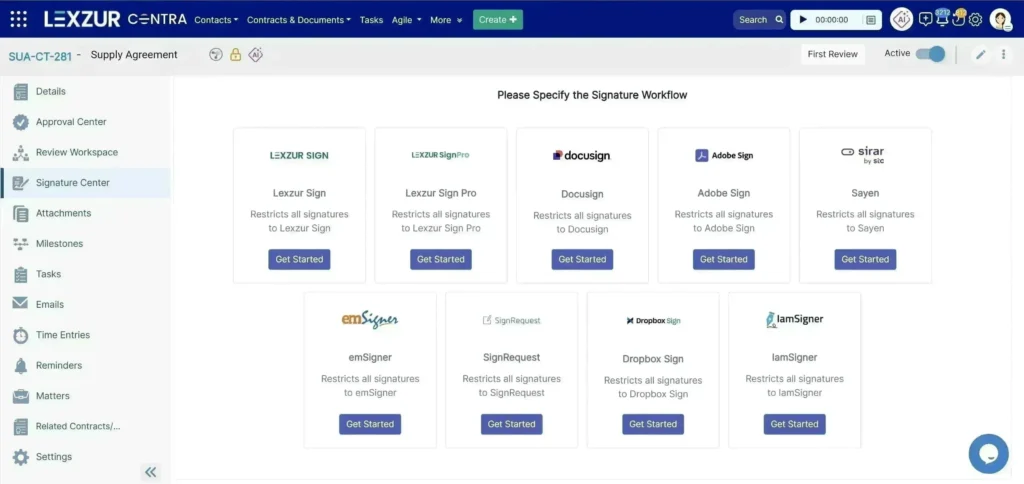
That last point is where contract lifecycle management earns its place. A basic tool captures the signature, but it won’t tell you which contracts expire next quarter, which obligations are overdue, which clauses changed, or which approvals are still pending. LEXZUR CONTRA goes past the signature screen — combining drafting, collaborative redlining, approval workflows, e-signature connections (including Lexzur Sign, Adobe Sign, and DocuSign integrations), alerts, reporting, and a searchable contract workspace.
Free tools solve “can I sign this one document.” They don’t solve “can I prove this will hold up” at scale — which is exactly what’s happening under the hood of every serious platform, and what we unpack next.
4. How digital signatures work: authentication, encryption, and legal trust
Knowing what’s under the hood helps you choose the right tool and defend a signature if it’s ever challenged.
A digital signature connects you to a specific version of a document using cryptography. It answers two questions: was this signature created with the expected signing key, and has the document changed since it was signed?
What makes a digital signature cryptographically secure?
Document
   ↓
A mathematical hash creates a digital fingerprint
   ↓
The signer’s private key signs that fingerprint
   ↓
The document and signature are delivered
   ↓
The recipient uses the public key to verify them
   ↓
The software confirms authenticity and integrity
A hash is a mathematical fingerprint of the document. Even a small change produces a different result.
The signer controls a private key, which is used to create the digital signature. The corresponding public key is used to verify it.
Sensitive documents may therefore require encryption during transmission and storage in addition to signing.
What a digital certificate does
A digital certificate links a public key to an identified person or organization. A certificate authority or trust service provider issues it after completing its own verification process. Verification software checks the certificate, its issuer, its validity or revocation status, whether the document changed, and the trust chain — so security depends on private-key protection, identity verification, the certificate provider, and correct validation, in that order.
Audit trails: what they capture and why courts care
An e-signature audit trail records the sequence of events around a document, potentially including: sender and recipient information, upload and creation time, delivery and viewing events, authentication method, IP address or device information, electronic-consent acceptance, signature date and time, failed or declined attempts, reminder and expiration events, document identifiers or checksums, and completion/final-delivery records. A tamper-evident seal shows whether the final file changed; the audit trail explains what happened around the transaction; cryptographic verification confirms the signed content stayed intact.
Callout: Strong evidence uses layers. The most defensible workflow combines signer authentication, explicit intent, a protected document, reliable timestamps, a complete audit trail, and controlled retention.
What happens if a digital signature is disputed in court?
A signer might claim their account was compromised, the wrong version was shown, or a required witness was missing. What you preserve matters: the completed document, the audit trail, authentication and consent records, timestamps, integrity checks, delivery history, and evidence of signing authority. A platform can’t fix invalid terms, but it can preserve a much clearer factual history.
Setting up a secure digital-signature workflow in a web app
A secure embedded workflow should authenticate the user, confirm authorization for the specific document, lock the approved version, protect API credentials and webhooks, handle failed or incomplete states, and retain the final document, audit trail, consent record, and transaction ID. Authentication strength should scale with transaction risk. Teams that don’t want to build this operational layer themselves can use LEXZUR CONTRA’s configurable contract workspace, which handles approvals, tracked collaboration, digital-signature integrations, reminders, reporting, access controls, and deployment options out of the box.
Understanding the security underneath every signature is exactly what you need to properly evaluate the platforms competing for your business — which is where we go next.
5. Best e-signature and contract-management platforms in 2026
Choosing the right platform starts with understanding which type of software your organization actually needs.
Dedicated e-signature platforms primarily help users prepare documents for signature, authenticate signers, route requests, track completion, and preserve evidence.
Contract lifecycle management platforms cover a much broader process, including contract creation, review, negotiation, approval, execution, storage, reporting, renewals, and obligation management. A CLM may include or integrate with e-signature technology, but that does not make it a dedicated e-signature platform.
Legal AI, legal practice-management, and document-automation platforms serve different purposes, although some may include or connect with electronic-signature functionality.
Dedicated e-signature platforms: DocuSign vs. Adobe Acrobat Sign
DocuSign and Adobe Acrobat Sign are directly comparable because electronic signing and agreement execution are central capabilities of both platforms.
Pricing note: The figures below are U.S. public prices checked in July 2026 and reflect annual commitments billed monthly. Prices, packaging, transaction limits, and regional availability may change. Contact each vendor for current enterprise pricing and final terms.
| Category | DocuSign | Adobe Acrobat and Acrobat Sign |
| Product category | E-signature and agreement-management platform | E-signature and PDF document platform |
| Core strength | Dedicated e-signature, recipient-routing, and agreement workflows | PDF creation, editing, preparation, and electronic signing |
| Entry public price | Personal: US$11/month | Acrobat Standard for teams: US$16.99/month per license |
| Business public price | Standard: US$30/user/month; Business Pro: US$45/user/month | Acrobat Pro for teams: US$23.99/month per license |
| Enterprise offering | Enhanced e-signature and agreement-management products; contact sales | Acrobat Sign Solutions; contact sales |
| PDF editing | Available through related DocuSign tools | Major built-in strength |
| Google Drive | Cloud-storage integration available | Integration available |
| Slack | Workplace integration included in eligible plans | Connections may be available through automation tools or enterprise configurations |
| Salesforce | Available through customized Enhanced plans; contact sales | Available through Acrobat Sign Solutions at the enterprise tier; not included in Acrobat Standard or Pro for teams |
| Bulk requests | Included in Business Pro and available through eligible customized plans | Available in eligible Acrobat Sign configurations |
| Best fit | Dedicated signing, recipient routing, and agreement workflows | Teams preparing, editing, and signing large volumes of PDFs |
DocuSign is generally a strong fit when dedicated signature routing, reusable templates, recipient management, and an extensive integration ecosystem are priorities.
Adobe may be more suitable when a team spends significant time creating, editing, converting, and preparing PDFs before requesting signatures.
LEXZUR CONTRA addresses a different requirement. It manages what happens before and after execution: contract creation, review, negotiation, redlining, approvals, storage, reporting, renewals, and obligations. It then connects these workflows with e-signature services such as Lexzur Sign, Adobe Sign, and DocuSign.
Can DocuSign integrate with Google Drive and Slack?
Yes. DocuSign supports Google Drive as a cloud-storage integration and Slack as a workplace integration on eligible plans. Available functionality may vary by integration, subscription, and configuration.
DocuSign also connects with platforms such as Microsoft 365 and Salesforce, although some enterprise integrations require a customized plan.
Platforms that manage broader contract and legal workflows
The platforms below should not be presented as direct alternatives to dedicated e-signature tools. They manage broader contract, document, legal, or law-firm workflows. Electronic signing may be built into the product, provided through a related product, or connected through an integration.
| Platform | Primary Category | Relationship to e.signature |
| LEXZUR CONTRA | Contract lifecycle management and document automation | Connects contract creation, review, negotiation, approval, and post-signature management with Lexzur Sign, Adobe Sign, DocuSign, and other signing services |
| Sirion | AI-powered enterprise contract lifecycle management | Treats electronic signing as one stage within an end-to-end contract lifecycle and obligation-management process |
| Harvey | Legal AI platform | Focuses on legal research, drafting, contract analysis, due diligence, and complex legal workflows; it is not primarily an e-signature platform or CLM |
| Clio | Legal practice-management software | Manages law-firm matters, clients, documents, billing, and related operations; it should not be classified as a dedicated e-signature platform |
| Clio Draft | Legal document-automation software | Combines document drafting, templates, data collection, and automation with built-in electronic-signature functionality |
These distinctions are important. Supporting electronic signatures does not automatically make a product an e-signature platform.
LEXZUR CONTRA and Sirion are CLM platforms that connect signing with the broader contract lifecycle. Harvey belongs to a different category as a legal AI platform. Clio is an LPMS, while Clio Draft provides legal document automation with built-in e-signature functionality.
When do you need an e-signature platform rather than a CLM?
Choose a dedicated e-signature platform when your primary requirement is to:
- Send prepared documents for signature.
- Authenticate recipients.
- Control signing order.
- Send reminders.
- Track completion.
- Retain audit trails and related evidence.
Consider a CLM platform when you also need to:
- Generate contracts from approved templates.
- Coordinate internal reviews and approvals.
- Negotiate and track redlines.
- Control contract versions and permissions.
- Connect contracts to an e-signature provider.
- Store executed agreements centrally.
- Monitor renewals, notices, risks, and obligations.
- Report on contract performance and cycle times.
LEXZUR CONTRA belongs to the second category. It is not an e-signature platform by definition. It is a contract lifecycle management and document-automation platform that connects the wider contract process with signing services such as Lexzur Sign, Adobe Sign, and DocuSign.
Which option is easiest for a small business?
“Easy” should mean more than having a clean signing screen. Businesses should compare setup time, recipient friction, mobile usability, templates, reminders, audit-trail access, document limits, integrations, support, and the amount of work remaining after signature.
Prepared, one-off PDFs may fit a focused DocuSign or Adobe workflow. Teams that also need recurring contract creation, negotiation, approval, storage, renewal, and obligation monitoring should evaluate a CLM platform such as LEXZUR CONTRA.
How to choose the right platform
Start by identifying the process you need to manage:
- If you only need to send completed documents for signature, compare dedicated e-signature platforms.
- If contracts pass through drafting, negotiation, approval, execution, storage, and renewal, compare CLM platforms.
- If your priority is AI-assisted research, drafting, review, or contract analysis, evaluate legal AI platforms.
- If you manage law-firm matters, clients, documents, billing, and operations, evaluate legal practice-management software.
- If your main objective is automating legal document production, evaluate document-automation platforms.
Once you have identified the correct category:
- List your document types and required formalities.
- Calculate the users, envelopes, bulk sends, and API calls you expect to need.
- Match authentication strength to transaction risk.
- Review a sample audit trail before committing.
- Confirm supported jurisdictions, hosting options, and integrations.
- Test the recipient experience on desktop and mobile.
- Review permissions, retention, security, support, and total cost.
- Decide whether you also need drafting, approvals, renewals, and obligation management.
- Pilot one real contract from request through execution and post-signature management.
The best platform is not necessarily the one with the longest feature list. It is the one whose product category and capabilities match the process your organization needs to manage.
6. How e-signature requests work: sending, tracking, and multi-recipient signing
Sending your first signature request — or your thousandth — here’s how to do it without losing track.
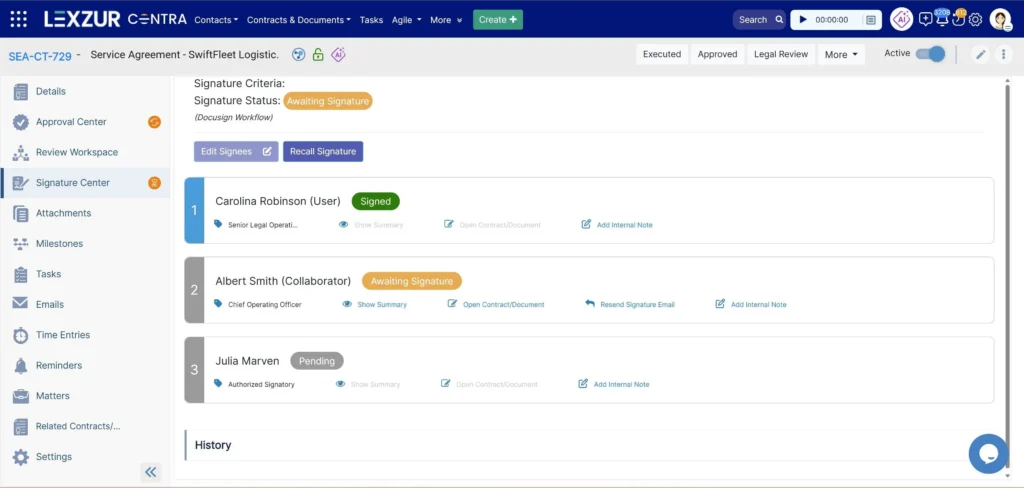
An e-signature request is a controlled invitation asking one or more people to review and sign a specific document. The platform ties the document, recipients, assigned fields, authentication, routing, reminders, and completion evidence together in one transaction.
How to send an e-signature request, step by step
- Upload or generate the approved document. Fix errors before anyone signs.
- Add recipients. Confirm names, addresses, roles, signing order, and authentication method.
- Assign fields. Place signatures, initials, dates, and data fields under the correct recipient.
- Configure routing. Use parallel, sequential, or mixed signing, and add internal approvals where needed.
- Write a clear message. State the document, required action, deadline, and contact person.
- Send and track. Monitor delivery, opening, authentication, completion, decline, and expiration.
- Store the evidence. Retain the final document, audit trail, certificate where available, and any resulting obligations.
Callout: The signature isn’t the end of the process. A completed agreement can trigger payment dates, notice periods, reporting duties, renewal windows, and other obligations that still need to be assigned and tracked.
What the signer sees?
Recipients typically get an email with a secure link. They open it, complete any identity check, consent to electronic signing, review the document, fill in their fields, and confirm. A good experience clearly shows who sent it, what action is required, which fields must be completed, how to ask a question or decline, and how the final copy will be delivered. Test this experience yourself from outside your organization, and on a mobile device.
Multi-recipient signing: order, reminders, and tracking
| Workflow | How it works | Best use |
| Parallel signing | Everyone receives the request at the same time | Independent approvals or equal signers |
| Sequential signing | Each recipient receives it after the previous action | Manager approval, then employee or customer |
| Mixed routing | Some recipients act together, others follow | Complex sales, procurement, or legal workflows |
| Approver plus signer | An internal reviewer approves before external signing | Controlled contract issuance |
| Bulk request | One template creates separate requests for many recipients | Policies, consent forms, standardized agreements |
| In-person signing | A representative guides signing on a shared device | Branch, retail, healthcare, or field workflows |
Which platforms support e-signature requests, and how do they differ?
DocuSign and Adobe Acrobat Sign are dedicated e-signature platforms. They are designed to prepare documents for signing, authenticate recipients, configure signing order, send reminders, track progress, and retain completion evidence.
Other platforms connect electronic signing to broader contract or legal workflows. LEXZUR CONTRA and Sirion are contract lifecycle management platforms—not dedicated e-signature tools. They treat signing as one stage within a wider process that may include contract creation, review, negotiation, approvals, storage, reporting, renewals, and obligation management. LEXZUR CONTRA supports execution through integrations with Lexzur Sign, Adobe Sign, DocuSign, and other signing services.
Harvey belongs to a different category as a legal AI platform focused on research, drafting, contract analysis, due diligence, and related legal workflows. Clio is legal practice-management software for managing law-firm matters, clients, documents, billing, and operations. Clio Draft is legal document-automation software that includes built-in e-signature functionality alongside drafting, templates, and data collection.
The right choice therefore depends on the process you need to manage. Choose a dedicated e-signature platform when your primary objective is sending and tracking prepared documents for signature. Consider a CLM platform when signing must connect with the wider contract lifecycle before and after execution. Supporting or integrating with electronic signatures does not, by itself, make a product a dedicated e-signature platform.
Best practices for high-volume signing
Use approved templates instead of one-off files. Pull names and commercial data from a trusted source. Separate internal approval from external execution. Restrict who can edit legal language and signature settings. Use consistent recipient roles and routing rules. Set reasonable reminders and expiration dates. Track declined, expired, and authentication-failed requests. Reconcile completed contracts with your business systems. Restrict bulk-send permission to people who need it. Retain the audit evidence — not just the visible PDF. Monitor turnaround time and abandonment. Track obligations and renewals after completion.
LEXZUR CONTRA supports this broader operating model through templates, automated approvals, role-based collaboration, tracked edits, signature integrations, alerts, reports, and a centralized contract workspace.
7. Online contract signing: how it works, what makes it legal, and the best tools
A signed digital contract is only as strong as the platform and process behind it.
Online contract signing is more than placing signature fields at the bottom of a PDF. A reliable digital contract workflow starts with an approved request and continues through drafting, review, negotiation, approval, execution, storage, renewal, and obligation management.
How online contract signing works, step by step
- Create the contract from an approved template or a controlled drafting process.
- Review the relevant terms with legal and business stakeholders.
- Negotiate using clear redlines, comments, and version control.
- Approve the final text according to authority and risk rules.
- Prepare a stable signing copy with correctly assigned fields.
- Authenticate and sign using a method appropriate to the transaction.
- Complete and distribute the protected final record.
- Store and manage renewals, notices, payments, and obligations.
Callout: A perfectly signed contract can still be badly managed. Missing an automatic-renewal deadline or a contractual obligation can cost more than any inefficiency in the signing stage ever did.
Is a digitally signed contract legally valid in every country?
No platform can guarantee one method for every contract. Rules vary by jurisdiction, document type, identity method, signature level, and formality.
| Jurisdiction | Main framework | General position | Key caveat | |
|---|---|---|---|---|
| United States | Federal ESIGN Act, 15 U.S.C. §§ 7001–7006, supplemented by applicable state electronic-transactions laws15 U.S. Code § 7001 – General rule of validity | U.S. Code | US Law | LII / Legal Information Institute | For transactions in or affecting interstate or foreign commerce, electronic signatures, contracts, and related records generally cannot be denied legal effect, validity, or enforceability solely because they are electronic or because electronic records or signatures were used in forming the contract | No person is generally required to accept electronic records or signatures. The Act leaves other substantive legal requirements in place under § 7001(b) and separately imposes specific consent and disclosure requirements for electronic consumer records under § 7001(c). Under § 7001(d), electronically retained records must accurately reflect the information, remain accessible for the required period, and be capable of accurate reproduction. Under § 7001(e), a legally required written record may be denied legal effect, validity, or enforceability if it cannot be retained and accurately reproduced for later reference. Certain documents and notices are excluded under § 7003. | |
| European Union | eIDAS Regulation (EU) No 910/2014Regulation – 910/2014 – EN – e-IDAS – EUR-Lex | An electronic signature cannot be denied legal effect or admissibility as evidence solely because it is electronic or does not meet the requirements for a qualified electronic signature. A qualified electronic signature has the equivalent legal effect of a handwritten signature (Art. 25). | If a Member State requires an advanced electronic signature for an online public-sector service, it must also recognize advanced electronic signatures based on a qualified certificate and qualified electronic signatures (Art. 27(1)). For cross-border use, it cannot require an electronic signature at a security level higher than a qualified electronic signature (Art. 27(3)). | |
| United Kingdom | Electronic Communications Act 2000, s.7Electronic Communications Act 2000 | An electronic signature incorporated into or logically associated with an electronic communication or electronic data, as well as certification of that signature, is admissible in legal proceedings on questions concerning the authenticity or integrity of the communication or data. | Section 7 addresses evidential admissibility; it does not by itself establish that an electronic signature satisfies every statutory or common-law formality required to execute a particular document. | |
| United Arab Emirates | Federal Decree-Law No. 46 of 2021 on Electronic Transactions and Trust ServicesElectronic Transactions and Trust Services law | The Official Platform of the UAE Government | The law regulates the validity of electronic documents and strengthens the legal value and security of digital signatures, according to the official UAE government description. It also establishes rules for storing electronic documents (Art. 6) and determining the time and place of their sending and receipt (Art. 14). | No person may provide Trust Services without a TDRA licence, while Qualified Trust Services additionally require qualified status (Art. 15). Under Art. 17, Trust Services include creating electronic and reliable electronic signatures and issuing authentication certificates for reliable electronic signatures. Qualified Trust Services separately include storing qualified electronic-signature data and validating qualified electronic signatures. | |
| Australia | Electronic Transactions Act 1999 (Cth), supplemented by applicable state and territory lawsElectronic Transactions Act 1999 – Federal Register of Legislation | For Commonwealth law purposes, a transaction is not invalid because it occurred wholly or partly through electronic communications (s.8), except to the extent that another, more specific provision of Part 2 deals with the transaction’s validity. A statutory signature requirement may be satisfied electronically where the method identifies the person and indicates their intention and is either appropriately reliable or proven in fact to have performed those functions (s.10(1)(a)–(b)). | Additional consent or information-technology requirements may apply depending on the recipient (ss.9–11). The Act is also subject to regulatory exemptions under s.7A, the court, tribunal, and evidence-related limitations in s.7B, and Schedule 1’s exclusion of specified migration and citizenship documents from s.11. |
For cross-border or high-value contracts, obtain advice in the relevant jurisdiction rather than relying only on a software provider’s general legality statement.
E-signature tools vs. contract lifecycle management: What’s the difference?
| Document signing | Contract lifecycle management |
| Adds signatures to a prepared file | Manages creation through post-signature obligations |
| Focuses on execution | Covers drafting, review, approval, negotiation, signing, storage |
| Often one-off uploads | Uses controlled templates and clause processes |
| Limited version management | Tracks versions, comments, deviations, and approvals |
| Stores completed files | Stores contracts with searchable information |
| Ends at completion | Tracks renewals, notices, obligations, and risk |
| Best for forms and simple agreements | Best for repeated or negotiated business contracts |
DocuSign and Adobe Sign focus heavily on execution. LEXZUR CONTRA manages the contract before signature, connects it to execution, and keeps managing it afterward.
What to look for in an online contract signing platform
Look for approved templates, clause and risk review, configurable approvals, redlining and version control, appropriate authentication, a searchable repository, and alerts for renewals and obligations. LEXA (LEXZUR’s AI layer) supports risk identification, clause analysis, compliance checks, summaries, ambiguous-language detection, and obligation extraction directly inside these workflows.
Digital contracting platforms and related legal tools compared
Which platforms support digital contract workflows, and what role does each one play?
These platforms serve different purposes. DocuSign and Adobe Acrobat Sign focus on electronic execution, LEXZUR CONTRA and Sirion manage broader contract lifecycles, and Harvey provides AI-assisted legal capabilities.
| Platform | Primary Strenght | Contract Workflow | Signing Position | Post-signature management |
| LEXZUR CONTRA | AI-assisted CLM and document automation | Templates, drafting, review, redlining, approvals, and LEXA-assisted analysis | Connects with Lexzur Sign, Adobe Sign, DocuSign, and other e-signature services available through the Lexzur Marketplace | Central repository, reminders, reporting, KPIs, renewals, and obligation management |
| DocuSign | Dedicated e-signature and agreement execution | Templates, recipient routing, comments, and broader agreement products | Electronic signing is a native core strength | Broader post-signature capabilities are available through additional DocuSign products |
| Adobe Acrobat Sign | PDF-centered electronic signing | PDF preparation, forms, signature requests, and tracking | Electronic signing is a native core strength | Strong document handling; broader CLM requirements may require additional systems |
| Harvey | Legal AI and contract analysis | AI-assisted review, research, due diligence, drafting, and playbooks | Not primarily an electronic-signature product | Focuses on legal intelligence rather than execution-led contract lifecycle management |
| Sirion | Enterprise contract lifecycle and obligation management | End-to-end lifecycle automation and contract intelligence | Treats signing as one stage within broader enterprise contract workflows | Strong obligation, performance, analytics, and renewal management |
LEXZUR CONTRA supports additional e-signature integrations beyond Lexzur Sign, Adobe Sign, and DocuSign. Visit the Lexzur Marketplace to explore the available integrations.
Why LEXZUR CONTRA stands out
It connects pre-approved templates, LEXA-assisted review, collaborative redlining, role-based access, configurable approvals, digital signature integrations, alerts and reminders, reports and KPIs, a centralized repository, and cloud or on-server deployment—which is why it’s relevant to legal, procurement, HR, sales, and finance teams that need more than a signature app.
What makes a digital contract legally valid and enforceable?
A sound digital contract generally needs authorized parties, clear and lawful terms, offer and acceptance, intent, an appropriate signature method, compliance with formalities, a reliable final version, signer attribution, and a reproducible record. The platform preserves process and evidence — it doesn’t replace valid terms, authority, or consent.
Your next step: from understanding to signing your first document today
Five points matter most:
- An e-signature records electronic intent.
- A digital signature adds cryptographic verification on top.
- Enforceability depends on evidence and local rules — not on which tool you used.
- Free tools suit lower-risk tasks; they become a liability as stakes rise.
- LEXZUR CONTRA connects execution to drafting, review, approval, storage, reporting, renewals, and obligations.
DocuSign and Adobe Acrobat Sign focus primarily on electronic execution, while LEXZUR CONTRA and Sirion manage broader contract lifecycle processes. Harvey serves a different role by supporting AI-assisted legal research, drafting, review, and analysis. The clearest next step is to map one real contract from request to renewal: who creates and approves it, which e-signature service handles execution, how signers are authenticated, where the completed agreement and supporting evidence are stored, and which renewals and obligations must be monitored afterward.
Talk to Lexzur
Digital Signatures: Sign Anywhere.
Request for a demo to Check Lexzur Contra in action
FAQ
It can be. A strong e-signature process demonstrates intent, consent, attribution, document integrity, and retention, while satisfying any required formalities. Some documents may still need a witness, notarization, a qualified signature, or a non-electronic procedure.
An electronic signature is any electronic method used to show intent to sign. A digital signature is a specific cryptographic technology that uses private and public keys — usually with a digital certificate — to authenticate the signer and reveal document changes.
Yes, for some low-risk agreements. Confirm the tool provides sufficient authentication, audit evidence, integrity protection, and retention for the transaction, and upgrade once you need stronger identity checks, higher volume, centralized administration, integrations, or full contract management.
For prepared PDFs, DocuSign or Adobe Sign offer a direct signing workflow. For teams that also draft, negotiate, approve, store, report on, and monitor contracts, LEXZUR CONTRA can reduce the need to manage those stages across separate tools.
An enforceable contract generally needs capable and authorized parties, clear agreement, lawful terms, intent, and compliance with applicable formalities. The signing system should preserve the final version and the evidence connecting each signer to it.
Most ordinary commercial contracts don’t require a witness just because they’re electronic. Certain deeds, wills, guarantees, property documents, and powers of attorney may still require witnessing or additional procedures — check the applicable rules before sending the document
Check four things. Security: encryption, two-factor signer authentication and a tamper-evident audit trail. Compliance: legal recognition in your country; in the UAE and Saudi Arabia, look for licensed trust service providers and national digital identity such as UAE Pass or Nafath. Ease of use: mobile signing without an account, plus Arabic support. Workflow: templates, reminders and a linked contract repository.
Combine four building blocks: an e-signature API or signing library (the DocuSign or Adobe Acrobat Sign APIs, or open-source PAdES libraries such as pyHanko or Apache PDFBox); keys stored in an HSM or cloud key vault; trusted timestamps from a timestamp authority; and a tamper-evident audit log. Add strong signer authentication, such as two-factor or national ID, and encrypt documents in transit and at rest.
Leave a comment